

Social Media Feather
By socialmediafeather
Lightweight social sharing and follow buttons for WordPress. Fast, flexible, and easy to use.
★ 4.6/5 (506)10,000+ active installations
- Version
- 2.3.2
- WordPress
- 5.9+
- Updated
- 2 Nov 2026
WORDPRESS RESOURCES
Explore public plugin information from the official WordPress.org directory. Compare what a plugin does, its requirements and update history before adding it to your website.
Explore WordPress hosting →10,000 matching plugins reported by WordPress.org · Page 14 of 50
Source: WordPress.org
Data refreshed 21 Nov 2026 19:53 UTC
By socialmediafeather
Lightweight social sharing and follow buttons for WordPress. Fast, flexible, and easy to use.

WordPress backup plugin: backups, restore & migration in minutes. Clone or duplicate your site, test updates on a staging copy. 100% unit-tested.

Get a fast contact form plugin. Create advanced forms using drag and drop form builder with all smart features.

By Brontobytes
Cookie Bar allows you to discreetly inform visitors that your website uses cookies.

By heiglandreas
Use your existing LDAP flexible as authentication backend for WordPress

By wptipsntricks
Very easy to use WordPress lightbox plugin to display YouTube and Vimeo videos in an elegant lightbox overlay.
By Roland Murg
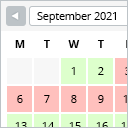
This booking calendar shows when something is booked or available. Use it to show when your holiday home is available for rent, for example.

By Logtivity Activity Logs
Logtivity is the activity log service for WordPress admins. Track user activity and site events across every WordPress site you maintain.
Level up your basic video embeds! Advanced features, privacy. Use URLs, Shortcodes or Blocks to customize videos to your needs.

By Ben Sibley
A simple, yet powerful WordPress analytics plugin that gives you privacy-friendly stats to grow your website. A Google Analytics alternative.
A fully featured, easy-to-use documentation plugin with AI chat, search, FAQs, and quizzes. Build beautiful knowledge bases, docs, and wikis.

By Chouby
Go multilingual in a simple and efficient way. Keep writing posts and taxonomy terms as usual while defining their languages all at once.
CHOOSE WHAT YOUR WEBSITE NEEDS
Start with the task you need to solve. Compare features, WordPress and PHP requirements, update history and the author’s documentation. Test changes on a private copy and avoid adding several plugins for the same job.
This independent directory displays plugin information on WebFulHost and links to the official source. Packages are not mirrored or installed here. A plugin can include paid extensions or services with separate terms from its author.

