SurveyJS: Drag & Drop Form Builder
By devsoftbaltic
Drag & Drop Form Builder for WordPress
★ 4.7/5 (3)400+ active installations
- Version
- 2.5.7
- WordPress
- 6.4+
- PHP
- 8.2+
- Updated
- 9 Nov 2026
WORDPRESS RESOURCES
Explore public plugin information from the official WordPress.org directory. Compare what a plugin does, its requirements and update history before adding it to your website.
Explore WordPress hosting →1,470 matching plugins reported by WordPress.org · Page 14 of 50
Source: WordPress.org
Data refreshed 26 Nov 2026 05:32 UTC
By devsoftbaltic
Drag & Drop Form Builder for WordPress

By Yevhen Leonidov
Complete security platform for everyday: block bots, brute-force, viruses, spam, fake crawlers. WAF, 2FA, no-malware, proactive defense.

The drag and drop AI form builder for contact forms, multi-step forms, payment forms, quizzes, polls, surveys, calculators, and web apps.

By Israpil
Textmetrics is the easiest way to create SEO proof content to rank higher and get more traffic. Realtime optimization, keyword research and more.
Find which plugins and theme slow down your site. Real per-component measurements on your own server, plus an optional community A-E score.

By Sirv CDN and Image Hosting
Serve perfectly optimized images, videos, models and 360 spins. The best WordPress & WooCommerce CDN plugin for media.
META TAGS for SEO allows you to display custom META Keywords strategically (based on Yoast / Rank Math in some cases) to boost your ranking on search …

By Brainstorm Force
Build a community right inside WordPress. Discussion spaces, courses, member profiles, and a beautiful dashboard — no coding needed.

By Fast Simon
Maximize your store sales with this easy-to-install plugin. Give shoppers a well-designed advanced search bar with live search suggestions.
Create a beautiful Photo Gallery, Image Gallery, or Portfolio. Use Simple Shortcodes and it Supports Gutenberg Block and Elementor Widget.
By PickPlugins
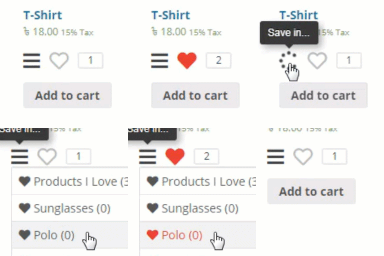
Add wishlist feature to your WooCommerce product or any post types.
A productivity desktop and custom dashboard for wp-admin: windows, dark mode, dashboard notes, an AI assistant, and a progressive web app (PWA).
CHOOSE WHAT YOUR WEBSITE NEEDS
Start with the task you need to solve. Compare features, WordPress and PHP requirements, update history and the author’s documentation. Test changes on a private copy and avoid adding several plugins for the same job.
This independent directory displays plugin information on WebFulHost and links to the official source. Packages are not mirrored or installed here. A plugin can include paid extensions or services with separate terms from its author.