Manage WooCommerce invoices with the first Gutenberg-based editor; it's user-friendly, and ensures professional, accurate billing.
30+ active installations
- Version
- 1.2.11
- WordPress
- 4.7+
- PHP
- 5.6+
- Updated
- 5 Oct 2026
View plugin details ↗WordPress virtual classroom plugin. Free BigBlueButton live class plugin for remote teaching, distance learning, and online classes.
★ 4.6/5 (10)400+ active installations
- Version
- 3.2.22
- WordPress
- 5.1+
- PHP
- 7.2+
- Updated
- 23 Oct 2026
View plugin details ↗Display Mercado Pago installment estimates and optional Pix comparisons in WooCommerce products, pages, blocks, templates and modals.
★ 5.0/5 (2)90+ active installations
- Version
- 1.5.1
- WordPress
- 5.0+
- PHP
- 7.2+
- Updated
- 7 Nov 2026
View plugin details ↗Export and import WordPress posts & pages as JSON files with full support for custom fields, taxonomies, ACF fields, and featured images.
★ 3.5/5 (2)400+ active installations
- Version
- 2.1.1
- WordPress
- 4.1.0+
- PHP
- 7.4+
- Updated
- 12 Nov 2026
View plugin details ↗Import Word documents into WordPress while preserving links, lists, formatting, images, tables, and more.
★ 4.5/5 (8)300+ active installations
- Version
- 1.0.9
- WordPress
- 5.0+
- PHP
- 7.4+
- Updated
- 24 Sep 2026
View plugin details ↗A free Gutenberg block to display images with zoom, magnify, clickable image maps, and 360° panorama rotation.
★ 5.0/5 (1)300+ active installations
- Version
- 1.1.2
- WordPress
- 6.5+
- PHP
- 7.4+
- Updated
- 17 Nov 2026
View plugin details ↗Extra Price Fields for Woocommerce is Plugin for adding extra price description to show in front end.
★ 4.8/5 (13)2,000+ active installations
- Version
- 2.0.1
- WordPress
- 3.0.0+
- Updated
- 22 Sep 2025
View plugin details ↗Integrates Divi theme with the MotoPress Hotel Booking plugin to modify content and styles visually via Divi builder.
★ 2.4/5 (5)1,000+ active installations
- Version
- 2.0.0
- WordPress
- 4.6+
- Updated
- 24 Apr 2026
View plugin details ↗Where slides come alive: advanced slider & carousel addons for Elementor — drag and drop, modern design, mobile responsive editing, and more.
★ 5.0/5 (1)30+ active installations
- Version
- 1.3.0
- WordPress
- 6.5+
- PHP
- 7.4+
- Updated
- 9 Jun 2026
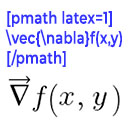
View plugin details ↗Render mathematical equations in WordPress as PNG images using pmath native syntax or LaTeX input with server-side rendering.
★ 4.2/5 (5)300+ active installations
- Version
- 3.0.5
- WordPress
- 5.0+
- PHP
- 7.2+
- Updated
- 9 May 2026
View plugin details ↗Comprehensive WooCommerce reporting plugin: sales reports, statistics, analytics & forecasts for orders, products, customers, countries & more.
★ 2.6/5 (8)300+ active installations
- Version
- 4.2.0
- WordPress
- 4.6+
- PHP
- 7.4+
- Updated
- 2 Nov 2026
View plugin details ↗Modern Elementor widget for music and podcast playlists.
★ 5.0/5 (1)10+ active installations
- Version
- 1.0.0
- WordPress
- 5.0+
- PHP
- 7.2+
- Updated
- 20 May 2026
View plugin details ↗