

AxG AI Site Assistant
By mathiasax
An elegant, fully responsive floating AI Chatbot bubble for your WordPress site. Connects securely to our secure AI Search platform.
0+ active installations
- Version
- 6.8.14
- WordPress
- 5.0+
- PHP
- 7.2+
- Updated
- 6 Nov 2026
WORDPRESS RESOURCES
Explore public plugin information from the official WordPress.org directory. Compare what a plugin does, its requirements and update history before adding it to your website.
Explore WordPress hosting →204 matching plugins reported by WordPress.org · Page 15 of 17
Source: WordPress.org
Data refreshed 24 Nov 2026 01:05 UTC
By mathiasax
An elegant, fully responsive floating AI Chatbot bubble for your WordPress site. Connects securely to our secure AI Search platform.

By mathiasax
Intelligent floating AI Chatbot for WooCommerce. Real-time product scanning, support FAQs, and automated back-office Conversation Insights!

By LeanPlugins
"Easy Product Image Zoom For WooCommerce" is a Product image zoom plugin for WooCoomerce Stores.

By Bluvia
Run A/B tests on your WordPress site and track conversions, with all experiment data stored in your own WordPress database.
Online booking for your website. Appointment scheduling with services, staff calendars, time slots and email confirmations. No per-booking fees.
Scan posts for AI-search readiness (GEO), add schema markup without an API key, and add an optional FAQ chatbot using your own AI key.

By AlexKole
Add and move images in your Gutenberg block as you like.

By DynamicLayers
Using DL Ultimate Custom ScrollBar for customize scrollbar, you get a very elegant and unique site. Consistent scroll behavior for every device.

By ThemesWP
Using Ultimate Custom ScrollBar for customize scrollbars, you get a very elegant and unique site. Consistent scroll behavior for every device.

By LeanPlugins
Simple, lightweight and customizable modern custom scrollbar, which allows you to replace the existing scrollbar of your website by an awesome custom …
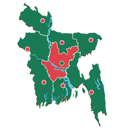
By Emran Hossen
Free WordPress plugin for embedding an interactive map of Bangladesh with clickable divisions.
CHOOSE WHAT YOUR WEBSITE NEEDS
Start with the task you need to solve. Compare features, WordPress and PHP requirements, update history and the author’s documentation. Test changes on a private copy and avoid adding several plugins for the same job.
This independent directory displays plugin information on WebFulHost and links to the official source. Packages are not mirrored or installed here. A plugin can include paid extensions or services with separate terms from its author.

