Very easily add breadcrumbs to your site with valid Schema Breadcrumb Markup, this plugin is also a drop-in replacement for RDFa Breadcrumb, just inst …
100+ active installations
- Version
- 2.1.4
- WordPress
- 2.2+
- Updated
- 10 Apr 2024
View plugin details ↗AI builds your Elementor page from a description, a mockup or a site you like. 36 free credits, ten ready-made cinematic pages and 65 widgets.
30+ active installations
- Version
- 3.0.0
- WordPress
- 6.0+
- PHP
- 7.4+
- Updated
- 16 Nov 2026
View plugin details ↗Design professional news and magazine sites with post grid, slider, list layouts, advanced post filters, and pagination.
★ 4.8/5 (265)30,000+ active installations
- Version
- 5.1.8
- WordPress
- 6.0+
- PHP
- 7.4+
- Updated
- 19 Nov 2026
View plugin details ↗An AI chat agent for your site, plus the AEO and GEO work behind it: get found, cited and recommended when shoppers ask an AI what to buy.
★ 5.0/5 (1)10+ active installations
- Version
- 1.1.124
- WordPress
- 6.2+
- PHP
- 7.4+
- Updated
- 19 Nov 2026
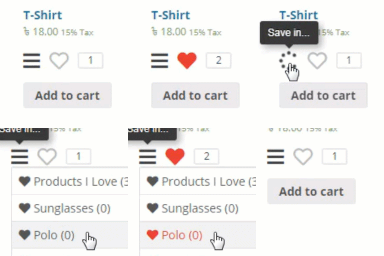
View plugin details ↗Add wishlist feature to your WooCommerce product or any post types.
★ 3.8/5 (13)300+ active installations
- Version
- 1.0.46
- WordPress
- 3.8+
- Updated
- 8 Jun 2026
View plugin details ↗Theme builder, form and checkout builders, custom and Google fonts, product options, 70+ widgets and 50+ dynamic tags for free Elementor.
20+ active installations
- Version
- 2.8.2
- WordPress
- 6.0+
- PHP
- 7.4+
- Updated
- 18 Nov 2026
View plugin details ↗Clean, lightweight WordPress SEO tools for metadata, sitemaps, schema, social output, redirects and reports.
0+ active installations
- Version
- 1.0.32
- WordPress
- 6.4+
- PHP
- 8.1+
- Updated
- 7 Jun 2026
View plugin details ↗The Best English Islamic Calendar plugin on WordPress.
★ 5.0/5 (1)100+ active installations
- Version
- 2.8.0
- WordPress
- 3.0+
- Updated
- 3 Dec 2025
View plugin details ↗Focused SEO controls for WordPress content, social previews, schema, robots rules, canonicals, breadcrumbs, and sitemaps.
0+ active installations
- Version
- 0.4.14
- WordPress
- 6.0+
- PHP
- 7.4+
- Updated
- 21 May 2026
View plugin details ↗Adds a "Collections" taxonomy to WooCommerce, working exactly like Product Categories.
10+ active installations
- Version
- 1.3.0
- WordPress
- 5.8+
- PHP
- 7.4+
- Updated
- 19 Sep 2026
View plugin details ↗180 admin, security and optimization tools in one plugin, all free. Enable only what you need; disabled modules never load.
★ 5.0/5 (2)10+ active installations
- Version
- 3.0.0
- WordPress
- 5.6+
- PHP
- 7.4+
- Updated
- 24 Sep 2026
View plugin details ↗Generate editable location and service-area landing pages for every city you cover, each quality-scored before it goes live.
★ 5.0/5 (2)0+ active installations
- Version
- 1.8.0
- WordPress
- 6.4+
- PHP
- 8.0+
- Updated
- 6 Nov 2026
View plugin details ↗