Automatically float YouTube videos on scroll as a sticky video. Features picture in picture floating video and smooth youtube scroll follow.
0+ active installations
- Version
- 1.10.1
- WordPress
- 5.6+
- PHP
- 7.4+
- Updated
- 19 Jul 2026
View plugin details ↗AJAX Load More button, infinite scroll and taxonomy filters for posts, pages and custom post types. Fast, filterable post grids - no page reloads.
★ 5.0/5 (3)30+ active installations
- Version
- 1.9.3
- WordPress
- 6.2+
- PHP
- 7.4+
- Updated
- 7 Oct 2026
View plugin details ↗The ultimate widget for displaying posts, custom post types or sticky posts with an array of options.
★ 4.5/5 (55)10,000+ active installations
- Version
- 2.3.2
- WordPress
- 3.5+
- Updated
- 17 Jul 2024
View plugin details ↗Force any image download with beautiful buttons, email gate, download tracking, AJAX, and more.
★ 4.9/5 (8)90+ active installations
- Version
- 2.6
- WordPress
- 6.0+
- PHP
- 7.4+
- Updated
- 7 May 2026
View plugin details ↗Showcase your podcast only using podcasting feed url. Use widget, shortcode or editor block to display podcast player anywhere on your site.
★ 4.8/5 (113)10,000+ active installations
- Version
- 8.3.9
- WordPress
- 4.9+
- PHP
- 5.6+
- Updated
- 18 Nov 2026
View plugin details ↗A custom block that automatically creates a clickable, customizable Jump Links table of contents from the headings in your post.
★ 5.0/5 (1)10+ active installations
- Version
- 2.2.0
- WordPress
- 6.3+
- PHP
- 7.4+
- Updated
- 21 Aug 2026
View plugin details ↗This WP plugin protects posts from being copied (content copy protection). Keep your content safe from unauthorized distribution!
★ 4.8/5 (1,139)100,000+ active installations
- Version
- 4.5
- WordPress
- 4.8+
- PHP
- 7.4+
- Updated
- 21 Nov 2026
View plugin details ↗RevivePress, the all-in-one tool for republishing & cloning old posts and pages which push old posts to your front page, the top of archive pages, …
★ 4.6/5 (116)4,000+ active installations
- Version
- 1.5.8
- WordPress
- 5.2+
- PHP
- 7.3+
- Updated
- 27 Dec 2024
View plugin details ↗Add a listing of content on your website using a simple shortcode. Filter the results by category, author, and more.
★ 4.8/5 (164)70,000+ active installations
- Version
- 3.0.3
- WordPress
- 3.0+
- Updated
- 14 Oct 2024
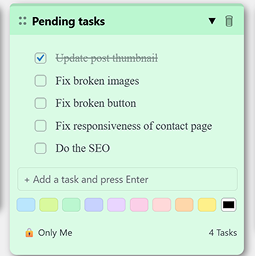
View plugin details ↗Create draggable admin notes with checklists inside your WordPress dashboard. Easily organize important tasks or reminders.
0+ active installations
- Version
- 1.0.0
- WordPress
- 5.5+
- PHP
- 7.4+
- Updated
- 17 Mar 2026
View plugin details ↗Helps website owners automate and add versatile schema markup to their websites, enabling more informative and visually appealing search results.
★ 4.8/5 (20)200+ active installations
- Version
- 1.0.34
- WordPress
- 5.0+
- PHP
- 7.4+
- Updated
- 18 Nov 2026
View plugin details ↗Take control of your media library, posts, pages, and other content with our folder manager. Organize your WordPress data into specific categories.
★ 4.6/5 (11)300+ active installations
- Version
- 2.9.1
- WordPress
- 4.6+
- PHP
- 7.4+
- Updated
- 24 Oct 2026
View plugin details ↗