Supercharge Elementor & Gutenberg with 29+ widgets, WooCommerce integrations, and a template system. SEO friendly & built for speed.
10+ active installations
- Version
- 2.0.9
- WordPress
- 5.6+
- PHP
- 7.4+
- Updated
- 5 Sep 2026
View plugin details ↗Turn your headings into a smooth horizontal navigation bar automatically, or build one by hand. Works with Elementor or Gutenberg.
10+ active installations
- Version
- 3.0.0
- WordPress
- 6.3+
- PHP
- 7.4+
- Updated
- 3 Sep 2026
View plugin details ↗Launch and grow your email marketing effortlessly with Hostinger Reach. Collect contacts, sync subscribers, and send emails – all in one, AI powered.
★ 5.0/5 (8)1,000,000+ active installations
- Version
- 1.8.11
- WordPress
- 6.3+
- PHP
- 8.1+
- Updated
- 17 Nov 2026
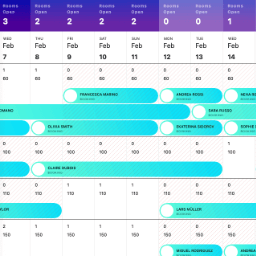
View plugin details ↗StayLodgic is a user-friendly property management system designed specifically for small to medium hotels, guesthouses, and vacation rentals.
★ 5.0/5 (1)10+ active installations
- Version
- 1.0.7
- PHP
- 7.4+
- Updated
- 5 Nov 2025
View plugin details ↗Free appointment booking with unlimited staff, a booking calendar and reminders — native in Gutenberg, Elementor, Beaver Builder and Breakdance.
10+ active installations
- Version
- 0.18.2
- WordPress
- 6.4+
- PHP
- 7.4+
- Updated
- 3 Oct 2026
View plugin details ↗Answer Engine Optimization for WordPress: AEO reports, Schema JSON-LD, FAQ, Gutenberg blocks, and an AI assistant that uses your own API key.
★ 5.0/5 (1)0+ active installations
- Version
- 1.1.0
- WordPress
- 6.4+
- PHP
- 8.0+
- Updated
- 11 Oct 2026
View plugin details ↗Insert PHP, JavaScript, CSS, HTML, ads & tracking code into WordPress headers, footers, pages & content with conditional logic — no theme editing.
★ 4.5/5 (221)50,000+ active installations
- Version
- 2.7.12
- WordPress
- 5.6+
- PHP
- 7.4+
- Updated
- 13 Nov 2026
View plugin details ↗A WordPress plugin to display top selling products with flexible settings for manual or automated product selection.
10+ active installations
- Version
- 1.0.1
- WordPress
- 5.2+
- PHP
- 7.2+
- Updated
- 8 May 2025
View plugin details ↗
By Tobias @Saleswonder.biz
Free unlimited live, automated & evergreen webinars on your own site. 500 visitors, zero sales? Sell live, right in the room.
★ 4.5/5 (51)80+ active installations
- Version
- 4.27.136
- WordPress
- 6.1+
- PHP
- 7.4+
- Updated
- 12 Nov 2026
View plugin details ↗Zero Blocks Given turns off WooCommerce / WP block frontend output at the code level. Five tiers, optional settings, no paywall.
10+ active installations
- Version
- 1.3.3
- WordPress
- 6.0+
- PHP
- 8.0+
- Updated
- 20 Aug 2026
View plugin details ↗Create accessible FAQ sections with manual, bulk, and optional WordPress AI-assisted entry plus FAQPage structured data.
0+ active installations
- Version
- 3.0.0
- WordPress
- 6.2+
- PHP
- 7.4+
- Updated
- 1 Oct 2026
View plugin details ↗Embed live, real-time polls on your WordPress site. Use a shortcode or the LivePolls Gutenberg block. No setup, no account required to vote.
0+ active installations
- Version
- 1.4.0
- WordPress
- 6.3+
- PHP
- 7.4+
- Updated
- 1 Sep 2026
View plugin details ↗