

Laqi Order Status Workflows for WooCommerce
By Laqi Logistics
Automatically move WooCommerce orders between statuses with a visual rule builder.
0+ active installations
- Version
- 1.13.8
- WordPress
- 6.8+
- PHP
- 7.4+
- Updated
- 22 Nov 2026
WORDPRESS RESOURCES
Explore public plugin information from the official WordPress.org directory. Compare what a plugin does, its requirements and update history before adding it to your website.
Explore WordPress hosting →220 matching plugins reported by WordPress.org · Page 16 of 19
Source: WordPress.org
Data refreshed 22 Nov 2026 23:43 UTC
By Laqi Logistics
Automatically move WooCommerce orders between statuses with a visual rule builder.

By Nikunj
Schedule WordPress.org-hosted updates with existing UpdraftPlus backup checks, update history and post-update health reports.

By leanmerce
WooCommerce purchase planning, replenishment forecasting, supplier purchase orders, incoming stock tracking and XLSX workflows.

By Le Potager du Web
Local privacy audits, legal documentation assistance, and optional consent management for WordPress.

By Plugins.shop
WooCommerce stock management with bulk editing, CSV imports, stock history, suppliers, purchase orders and partial receiving.

By jmarck
Control admin menus, runtime capabilities, redirects, and supported booking-plugin navigation by WordPress user role.
By moayyed alharthi
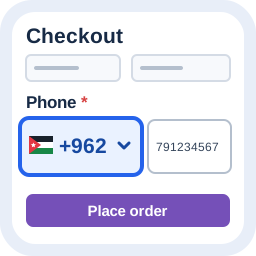
Search country calling codes, keep international numbers intact, and safely normalize Classic Checkout phone input.

By shoppingadssolutions
Read-only connection between your WordPress website and your SAS client workspace.

By IDSource
Splits WooCommerce order profit between a partner and an owner using stored snapshots and locked settlement periods.

By atomjb
Organize your media library into real folders on the server — not virtual ones. Files are physically moved and every database path is updated.

By youzurz
Visual translation workspace and Gettext catalog for WordPress, plugins and themes, with review, publication and approved translation memory.

By Pagup
Display Shopify products on WordPress with a catalog, product pages and a cart. Keep checkout on Shopify. No WooCommerce needed.
CHOOSE WHAT YOUR WEBSITE NEEDS
Start with the task you need to solve. Compare features, WordPress and PHP requirements, update history and the author’s documentation. Test changes on a private copy and avoid adding several plugins for the same job.
This independent directory displays plugin information on WebFulHost and links to the official source. Packages are not mirrored or installed here. A plugin can include paid extensions or services with separate terms from its author.