Seed Fonts
By SeedThemes
Use web fonts (@font-face) by choosing from Google Fonts, Bundled Thai-English fonts, and your own web fonts.
★ 4.6/5 (16)20,000+ active installations
- Version
- 2.4.3
- WordPress
- 4.9+
- PHP
- 7.4+
- Updated
- 20 Nov 2026
WORDPRESS RESOURCES
Explore public plugin information from the official WordPress.org directory. Compare what a plugin does, its requirements and update history before adding it to your website.
Explore WordPress hosting →3,676 matching plugins reported by WordPress.org · Page 16 of 50
Source: WordPress.org
Data refreshed 21 Nov 2026 04:33 UTC
By SeedThemes
Use web fonts (@font-face) by choosing from Google Fonts, Bundled Thai-English fonts, and your own web fonts.

By Alisha Thomas
A modern "2-in-1" save button for the classic AND block editor: save the post and instantly go to your next action.

By Omnisend
Email Marketing, Newsletter, Email Automation, Forms, Pop Up, SMS, Abandoned Cart made easy for WordPress & WooCommerce by Omnisend

By HappyDevs
Add FAQs anywhere in WordPress & WooCommerce. AI-written answers with no API key, product FAQs by category & tag, help center and FAQ schema.

By Daisuke Yamamoto
Keep image quality while making files smaller for faster pages - just install and you're set, with automatic WebP and AVIF.
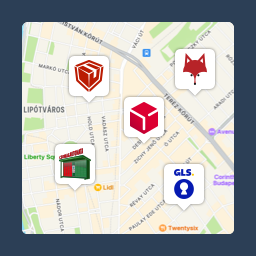
Pickup point map and shipping labels for WooCommerce, for home delivery too. MPL, Foxpost, GLS, DPD, Express One, Packeta and more.
Formerly "Instagram Feed". Display clean, customizable, and responsive Instagram feeds from multiple accounts. Supports Instagram oEmbeds.

By Snapp! Box
Manage WooCommerce deliveries through SnappBox directly from your WordPress dashboard.

By seshelby
Create fully accessible content spoilers or accordions with a shortcode.

By Atanas Yonkov
Easily add an interactive step-by-step user guide (intro tour) for your visitors. Based on Shepherd.js (https://shepherdjs.dev/).
Lightbox Block lets you display images, audio, video, and custom content in responsive lightbox galleries or media popups.

By saumya010
FAQ and accordion block for Gutenberg. Bulk paste a whole FAQ at once — add, reorder and edit every question inside one block.
CHOOSE WHAT YOUR WEBSITE NEEDS
Start with the task you need to solve. Compare features, WordPress and PHP requirements, update history and the author’s documentation. Test changes on a private copy and avoid adding several plugins for the same job.
This independent directory displays plugin information on WebFulHost and links to the official source. Packages are not mirrored or installed here. A plugin can include paid extensions or services with separate terms from its author.