Restrict content access for WordPress (WP) | Restrict pages/posts in WP based on user roles and login status to protect content
★ 4.3/5 (16)1,000+ active installations
- Version
- 1.6.2
- WordPress
- 3.7+
- PHP
- 5.6+
- Updated
- 29 Oct 2026
View plugin details ↗Grow your organic traffic and AI visibility with powerful SEO tools, XML sitemaps, Schema automation, and built-in AI SEO, all in one place.
★ 4.8/5 (7,530)4,000,000+ active installations
- Version
- 1.0.282
- WordPress
- 6.7+
- PHP
- 7.4+
- Updated
- 10 Nov 2026
View plugin details ↗Search Engine (SEO) & Performance Optimization (WPO) via caching. Integrated caching: CDN, Page, Minify, Object, Fragment, Database support.
★ 4.4/5 (5,420)800,000+ active installations
- Version
- 2.11.0
- WordPress
- 6.0+
- PHP
- 7.4+
- Updated
- 20 Oct 2026
View plugin details ↗Add subtitles (subheadings) to your pages, posts or custom post types.
★ 4.1/5 (21)10,000+ active installations
- Version
- 3.4.2
- WordPress
- 5.6+
- PHP
- 5.6+
- Updated
- 5 Mar 2026
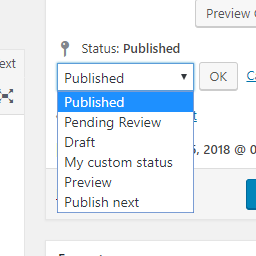
View plugin details ↗Add new statuses to all post types (posts, pages, products, ...).
★ 4.5/5 (11)1,000+ active installations
- Version
- 1.1.1
- WordPress
- 5.0+
- PHP
- 7.2+
- Updated
- 1 Sep 2026
View plugin details ↗Create stunning and interactive timelines for your WordPress posts with ease. Post Timeline is the ultimate plugin for displaying your WordPress conte …
★ 4.2/5 (21)700+ active installations
- Version
- 2.4.3
- WordPress
- 4.8+
- Updated
- 20 Aug 2026
View plugin details ↗Create WooCommerce subscriptions with recurring payments, Subscription Box features, and membership plans with flexible access rules to grow recurring …
★ 4.5/5 (182)10,000+ active installations
- Version
- 2.1.2
- WordPress
- 6.7+
- PHP
- 7.4+
- Updated
- 19 Nov 2026
View plugin details ↗
By Elliot Sowersby / RelyWP
Add Cloudflare Turnstile to WordPress, WooCommerce, Contact Forms & more. The user-friendly, privacy-preserving reCAPTCHA alternative. 100% free!
★ 4.7/5 (266)200,000+ active installations
- Version
- 1.44.7
- WordPress
- 4.7+
- Updated
- 21 Nov 2026
View plugin details ↗Sell Pages/Posts through WooCommerce 2.6+ quickly and easily. Tested up to WooCommerce Version 11.2.x
★ 4.7/5 (53)1,000+ active installations
- Version
- 3.3.0
- WordPress
- 3.8+
- PHP
- 7.4+
- Updated
- 23 Oct 2026
View plugin details ↗Easily control whether the featured image appears in the single post or page view (doesn't hide it in archive/list view).
★ 4.8/5 (38)30,000+ active installations
- Version
- 3.5.0
- WordPress
- 6.7+
- PHP
- 5.6+
- Updated
- 20 Nov 2026
View plugin details ↗The easiest way to connect Google Analytics 4 to WordPress. See real-time stats, eCommerce, and events tracking, right in your dashboard.
★ 4.7/5 (488)20,000+ active installations
- Version
- 9.1.2
- WordPress
- 4.0+
- Updated
- 25 Sep 2026
View plugin details ↗Add a PayPal Buy Now Button to your website and start selling with PayPal and Stripe today. No Coding Required. Official PayPal & Stripe Partner.
★ 4.5/5 (24)10,000+ active installations
- Version
- 2.0.6
- WordPress
- 4.7+
- PHP
- 5.4+
- Updated
- 23 Sep 2026
View plugin details ↗