

Build a waiting list for your products and notify customers by email based on product availability.
★ 4.6/5 (113)4,000+ active installations
- Version
- 2.9.3
- WordPress
- 3.0.1+
- Updated
- 2 Nov 2026
WORDPRESS RESOURCES
Explore public plugin information from the official WordPress.org directory. Compare what a plugin does, its requirements and update history before adding it to your website.
Explore WordPress hosting →3,444 matching plugins reported by WordPress.org · Page 17 of 50
Source: WordPress.org
Data refreshed 25 Nov 2026 11:12 UTC
Build a waiting list for your products and notify customers by email based on product availability.
The original WooCommerce multi-vendor plugin. Easily create a WooCommerce marketplace with multi-seller, product vendor stores & vendor commissions.

By Omnisend
Email Marketing, Newsletter, Email Automation, Forms, Pop Up, SMS, Abandoned Cart made easy for WordPress & WooCommerce by Omnisend

By WP Swings
Create, sell and manage WooCommerce gift cards to attract more sales and multiply your revenue at your online store.

By Creame
The most installed WordPress plugin for WhatsApp: a customizable floating button that turns your visitors into chats, leads and sales.
Easy to show posts, pages, custom posts in customizable grid, list, slider, accordion... Available as Widgets (for Elementor), Shortcode, and Blocks.

By YayCommerce
YayExtra – Product Options for WooCommerce lets you add customizable options and extra fields to your products.
By Pektsekye
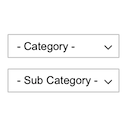
Displays product categories as dependent drop-down selects.

By PI Web Solution
Features offered: Add to cart redirect, Quick purchase button, Buy now button, Quick View product, option to change quantity on checkout page.

By WP Swings
This WordPress Booking Plugin lets you manage full-day bookings, service appointments, Accept/reject bookings, show booking availability & much more.
Best WooCommerce Upsell plugin to create checkout upsells, cross-sells, order bumps and frequently bought together bundles to increase AOV.

By datafeedr
Import products from the Datafeedr API into your WooCommerce store.
CHOOSE WHAT YOUR WEBSITE NEEDS
Start with the task you need to solve. Compare features, WordPress and PHP requirements, update history and the author’s documentation. Test changes on a private copy and avoid adding several plugins for the same job.
This independent directory displays plugin information on WebFulHost and links to the official source. Packages are not mirrored or installed here. A plugin can include paid extensions or services with separate terms from its author.


