

Supercharge WooCommerce with FREE Abandoned Cart Recovery, Product Variation Swatches, PDF Invoices & 100+ tools. Boost sales & save time.
★ 4.6/5 (539)30,000+ active installations
- Version
- 9.0.0
- WordPress
- 5.8+
- PHP
- 7.3+
- Updated
- 4 Nov 2026
WORDPRESS RESOURCES
Explore public plugin information from the official WordPress.org directory. Compare what a plugin does, its requirements and update history before adding it to your website.
Explore WordPress hosting →1,375 matching plugins reported by WordPress.org · Page 17 of 50
Source: WordPress.org
Data refreshed 23 Nov 2026 16:21 UTC
Supercharge WooCommerce with FREE Abandoned Cart Recovery, Product Variation Swatches, PDF Invoices & 100+ tools. Boost sales & save time.
By Felix W.
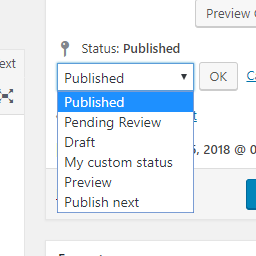
Add new statuses to all post types (posts, pages, products, ...).

By A WP Life
Create animated gallery walls with image-switching effects. Display photos from Instagram, Flickr, or media uploads.

By PluginEver
Showcase WooCommerce product categories in sliders, grids, or blocks with styling control, responsive layouts, and shortcode support

By YummyWP
Boost WooCommerce sales with instant Ajax product search — live suggestions, fullscreen popup, SKU search, and GA4 analytics, all in one plugin.

By Priyanshu Chaudhary
Build beautiful, conversational step-by-step forms, surveys & quizzes — self-hosted and free.

By WPS.sk
Optimizes images on upload. Define max. size and select the types of images to convert to webp and what quality the optimized image should have.

By WP Lab
List products from WordPress on Amazon.

By Qui Nguyen
Free WooCommerce booking plugin — add a date & time picker to any product for appointments, rentals, and services. No subscription required.

By hardlyneutral
Allows a new BuddyPress user to select groups to join during the registration process.
EasyPost Shipping plugin for WooCommerce displays live shipping rates at cart / checkout pages.

By artiosmedia
This plugin will allow a user to add up to two additional internal product identifiers to the order process in addition to the GTIN, EAN, SKU, or UPC.
CHOOSE WHAT YOUR WEBSITE NEEDS
Start with the task you need to solve. Compare features, WordPress and PHP requirements, update history and the author’s documentation. Test changes on a private copy and avoid adding several plugins for the same job.
This independent directory displays plugin information on WebFulHost and links to the official source. Packages are not mirrored or installed here. A plugin can include paid extensions or services with separate terms from its author.
