Contact Form Clean and Simple
By fullworks
A clean and simple contact form with flexible CSS framework support.
★ 4.7/5 (195)7,000+ active installations
- Version
- 4.12.3
- WordPress
- 5.6+
- PHP
- 7.4+
- Updated
- 3 Sep 2026
WORDPRESS RESOURCES
Explore public plugin information from the official WordPress.org directory. Compare what a plugin does, its requirements and update history before adding it to your website.
Explore WordPress hosting →1,905 matching plugins reported by WordPress.org · Page 17 of 50
Source: WordPress.org
Data refreshed 26 Nov 2026 08:08 UTC
By fullworks
A clean and simple contact form with flexible CSS framework support.
Block emails, shipping addresses, phones, names and IPs during WooCommerce checkout — including block checkout and express payment buttons.
The most complete free WordPress anti-spam plugin. Protects Contact Form 7, comments, login, registration, REST API, and XML-RPC — all in one shield.

By Arnan de Gans
Prevent bots from creating accounts by blacklisting domains and usernames and present people with a human friendly security question.

By ReplyBox
A simple, privacy-focused comment system that's lightweight and blazingly-fast.

By apasionados
DoFollow Case by Case allows you to selectively apply dofollow to comments and make links in pages or posts nofollow.
Harden your site security with Login Security, Two-Factor Authentication (2FA), Vulnerability Scanner, Firewall, and more. Formerly iThemes Security.
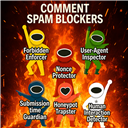
By Kasuga
A simple and lightweight yet rock-solid plugin that blocks comment spam using multiple automatic detection methods.

By Marketing Fire
Discussion Board is a simple, effective way to add a forum or discussion board to your site, helping you build and engage an active community.
OTP via SMS, Email/WhatsApp. WooCommerce SMS Notifications, Phone OTP Login, Passwordless Login, 10 Free SMS/Email Transactions, Custom SMS Gateway.

By Brandon Fowler
Enable email authentication/validation for the default WordPress PHPMailer.

By CrossPeak
Add-on for Gravity Forms to create a Blacklisting of specific emails or domains for the Email input field to throw a validation error or mark as spam.
CHOOSE WHAT YOUR WEBSITE NEEDS
Start with the task you need to solve. Compare features, WordPress and PHP requirements, update history and the author’s documentation. Test changes on a private copy and avoid adding several plugins for the same job.
This independent directory displays plugin information on WebFulHost and links to the official source. Packages are not mirrored or installed here. A plugin can include paid extensions or services with separate terms from its author.