Filter WooCommerce products by color, size, attribute, categories and tags. Customize your filtering and set a schedule for ordering.
★ 3.7/5 (14)500+ active installations
- Version
- 3.3.10
- WordPress
- 4.0+
- Updated
- 20 Aug 2026
View plugin details ↗Social media automation, social media scheduling and auto publish for WordPress posts to Facebook, X/Twitter, Threads, LinkedIn, Telegram and more.
★ 4.3/5 (11)200+ active installations
- Version
- 1.4.6
- WordPress
- 6.2+
- PHP
- 7.4+
- Updated
- 5 Nov 2026
View plugin details ↗Add unlimited RSS feeds, import their items automatically, and show them anywhere on your site with a block or shortcode.
★ 4.5/5 (566)40,000+ active installations
- Version
- 5.8.0
- WordPress
- 6.2.2+
- PHP
- 7.4.0+
- Updated
- 18 Nov 2026
View plugin details ↗Connect WooCommerce and Polylang for a multilingual store.
★ 4.7/5 (124)8,000+ active installations
- Version
- 1.6.0
- WordPress
- 5.4+
- PHP
- 7.0+
- Updated
- 18 Oct 2026
View plugin details ↗Create high-converting WooCommerce checkout pages, thank you pages & sales funnels with the highest-rated WordPress funnel builder.
★ 5.0/5 (1,032)30,000+ active installations
- Version
- 3.19.0.2
- WordPress
- 6.2+
- PHP
- 7.4+
- Updated
- 21 Nov 2026
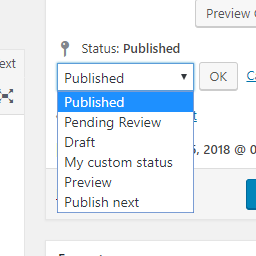
View plugin details ↗Add new statuses to all post types (posts, pages, products, ...).
★ 4.5/5 (11)1,000+ active installations
- Version
- 1.1.1
- WordPress
- 5.0+
- PHP
- 7.2+
- Updated
- 1 Sep 2026
View plugin details ↗Connect Claude and other AI clients to your WordPress site to fix SEO and edit Elementor pages and menus, with a rollback for every change.
200+ active installations
- Version
- 1.22.0
- WordPress
- 6.2+
- PHP
- 8.0+
- Updated
- 21 Nov 2026
View plugin details ↗Disqus is the web's most popular comment system. Use Disqus to increase engagement, retain readers, and grow your audience.
★ 2.7/5 (219)30,000+ active installations
- Version
- 3.1.6
- WordPress
- 4.4+
- PHP
- 5.6+
- Updated
- 22 Oct 2026
View plugin details ↗Build photo galleries, image galleries, and portfolio grids with gallery blocks. Masonry, lightbox, sliders, and filters included.
★ 4.8/5 (342)50,000+ active installations
- Version
- 3.11.0
- WordPress
- 6.2+
- PHP
- 8.3+
- Updated
- 17 Nov 2026
View plugin details ↗Transform your WordPress theme into a platform for publishing your webcomics.
★ 4.6/5 (8)1,000+ active installations
- Version
- 2.41
- WordPress
- 5.3+
- Updated
- 20 Nov 2026
View plugin details ↗Control your sites RSS feeds with additional query param options.
★ 5.0/5 (1)300+ active installations
- Version
- 4.2.0
- WordPress
- 4.0+
- PHP
- 7.4+
- Updated
- 22 Oct 2026
View plugin details ↗Simple Page Redirect is an easy-to-use WordPress plugin that lets you quickly redirect any post, page, or custom post type to an internal or external …
★ 5.0/5 (8)10,000+ active installations
- Version
- 1.8.1
- WordPress
- 3.0+
- PHP
- 5.0+
- Updated
- 6 Oct 2026
View plugin details ↗