Publish and link together a series of posts using a new "series" taxonomy. Automatically display links to other posts in a series above your content.
★ 4.7/5 (9)600+ active installations
- Version
- 2.1.0
- WordPress
- 6.6+
- PHP
- 7.4+
- Updated
- 6 Oct 2026
View plugin details ↗Responsive slider plugin to create sliders in visual editor easily. Build beautiful image slider, layer slider, video slider, post slider, and more.
★ 4.9/5 (1,126)800,000+ active installations
- Version
- 3.5.1.40
- WordPress
- 5.0+
- PHP
- 7.0+
- Updated
- 28 Oct 2026
View plugin details ↗CodePeople Post Map lets you geotag posts and seamlessly integrate your blog with Google Maps for a smooth, location-aware experience.
★ 4.2/5 (31)3,000+ active installations
- Version
- 1.3.1
- WordPress
- 3.0.5+
- Updated
- 19 Nov 2026
View plugin details ↗Make a copy of posts and pages with just one click.
★ 4.7/5 (13)50,000+ active installations
- Version
- 9.3
- WordPress
- 4.5+
- PHP
- 5.6+
- Updated
- 6 Mar 2026
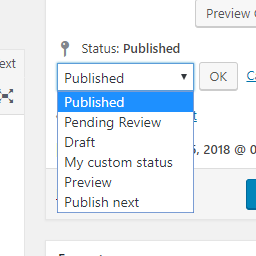
View plugin details ↗Add new statuses to all post types (posts, pages, products, ...).
★ 4.5/5 (11)1,000+ active installations
- Version
- 1.1.1
- WordPress
- 5.0+
- PHP
- 7.2+
- Updated
- 1 Sep 2026
View plugin details ↗Automatically share your WordPress posts on multiple social networks like Facebook, X (Twitter), LinkedIn, Instagram and more.
★ 4.0/5 (556)20,000+ active installations
- Version
- 9.4.6
- WordPress
- 4.7+
- PHP
- 7.4+
- Updated
- 15 Nov 2026
View plugin details ↗This plugin adds a neat and easy to use sidebar tree view to your posts and pages backend.
★ 5.0/5 (4)600+ active installations
- Version
- 2.0.6
- WordPress
- 6.5.0+
- PHP
- 8.0+
- Updated
- 13 Oct 2026
View plugin details ↗Create an AI-powered frontend post form, user registration form, user profile page, membership site, user directory, and content restriction.
★ 4.1/5 (537)20,000+ active installations
- Version
- 4.3.15
- WordPress
- 5.0+
- PHP
- 7.4+
- Updated
- 16 Nov 2026
View plugin details ↗Quickly search and filter categories and taxonomies inside the WordPress admin.
★ 5.0/5 (25)1,000+ active installations
- Version
- 1.7.5
- WordPress
- 6.0+
- PHP
- 7.4+
- Updated
- 29 Oct 2026
View plugin details ↗Want to boost sales & marketing efforts? Use your favorite forms & builder. Unlimited popups & impressions, keep your data, no monthly subscription.
★ 4.9/5 (4,518)600,000+ active installations
- Version
- 1.25.0
- WordPress
- 6.7+
- PHP
- 7.4+
- Updated
- 11 Sep 2026
View plugin details ↗The most flexible filters for WooCommerce products & WordPress content. Includes everything needed, supports Elementor & builders, AJAX, quick setup.
★ 4.6/5 (154)50,000+ active installations
- Version
- 1.9.8
- WordPress
- 6.0+
- PHP
- 7.4+
- Updated
- 2 Nov 2026
View plugin details ↗Create a Simple Giveaway or Giveaways and grow your email list. Embed them in a post or in a sidebar to increase the conversion.
★ 4.6/5 (20)400+ active installations
- Version
- 2.50.1
- WordPress
- 4.0+
- Updated
- 9 Nov 2026
View plugin details ↗