
Database Reset
By WebFactory
Skip reinstalling WP to reset it & reset the WordPress database back to its original state with 1-click.
★ 4.5/5 (77)10,000+ active installations
- Version
- 3.25
- WordPress
- 4.2+
- PHP
- 5.2+
- Updated
- 16 Aug 2026
WORDPRESS RESOURCES
Explore public plugin information from the official WordPress.org directory. Compare what a plugin does, its requirements and update history before adding it to your website.
Explore WordPress hosting →47 matching plugins reported by WordPress.org · Page 2 of 4
Source: WordPress.org
Data refreshed 24 Nov 2026 17:55 UTC
By WebFactory
Skip reinstalling WP to reset it & reset the WordPress database back to its original state with 1-click.

By kursrublya
Kurs Rublya FX widgets for WordPress: rate cards, currency calculator, and multi-currency board. Data via kurs-rublya.ru.
The most advanced Audio Player for Music & Podcast. For Elementor, Gutenberg, WooCommerce and more. Add unlimited players to any pages!
By Graham
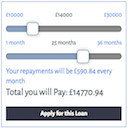
A simple repayment calculator. Uses sliders to set the amount and term and displays a range of outputs
Accept ETH, USDC, USDT, DAI, BTC & Lightning in WooCommerce. Non-custodial, low fees, no card chargebacks.

By Tazapay
This plugin enables your WooCommerce powered platform to start accepting international payments via Tazapay's Escrow product.

By Morgan Goodwin
Automatically calculate and display shipping, duties & taxes on your WooCommerce checkout, as a Total Landed Cost. Giving global buyers an inform …

By venrose
Manage supplier prices, discounts, and manual exchange rates for simple WooCommerce products.
WordPress security for Japanese sites: login protection, 2FA, file protection and malware scanning, each explained in clear Japanese.

By eezznet
Estimate WooCommerce payout amounts in a target currency after payment fees, withdrawal costs and FX spread.
Accept ETH, USDC, USDT, DAI, BTC & Lightning in PMP. Non-custodial, low fees, no card chargebacks.

By Peg
Let shoppers see and pay in their own currency. One extra currency at your exchange rate, picked by country or with a switcher.
CHOOSE WHAT YOUR WEBSITE NEEDS
Start with the task you need to solve. Compare features, WordPress and PHP requirements, update history and the author’s documentation. Test changes on a private copy and avoid adding several plugins for the same job.
This independent directory displays plugin information on WebFulHost and links to the official source. Packages are not mirrored or installed here. A plugin can include paid extensions or services with separate terms from its author.