

Featured Image in RSS Feed by MailerLite
By MailerLite
This plugin automatically adds featured images of your posts into the RSS feed.
★ 5.0/5 (1)1,000+ active installations
- Version
- 1.0.10
- WordPress
- 4.0+
- PHP
- 5.3+
- Updated
- 12 Oct 2026
WORDPRESS RESOURCES
Explore public plugin information from the official WordPress.org directory. Compare what a plugin does, its requirements and update history before adding it to your website.
Explore WordPress hosting →4,425 matching plugins reported by WordPress.org · Page 2 of 50
Source: WordPress.org
Data refreshed 20 Nov 2026 11:38 UTC
By MailerLite
This plugin automatically adds featured images of your posts into the RSS feed.

By cyrillbolliger
Easily control whether the featured image appears in the single post or page view (doesn't hide it in archive/list view).

By Themeisle
Automatically generate, assign, and manage featured images in bulk so every post on your site has a featured image.

By 5 Star Plugins (Rob)
Send images to RSS instantly for free. Output blog or WooCommerce photos to Mailchimp RSS email campaigns, ActiveCampaign, Hubspot, Feedly and more.

By Fesomia
Allows adding custom captions to the featured images of the posts.

By webdevstudios
If a YouTube or Vimeo video embed exists near the start of a post, we'll automatically set the post's featured image to a thumbnail of the video.

By Sanny Srivastava
SNY Auto Featured Image automatically sets featured images from content, external URLs, or defaults. Bulk preview & apply for existing posts.
By WPZOOM
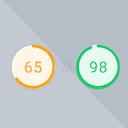
Preload Featured Images automatically in posts to increase the PageSpeed Score.

By JetixWP Plugins
Really Simple Featured Video lets you add product video & featured video to WooCommerce Products & Posts, Pages, CPTs (with featured images) a …

By Aum Watcharapon
Get the best photos from free license website like Unsplash. You can customize images by inserting layers and texts.

By SilkyPress
Awesome image zoom plugin for images in posts/pages and for WooCommerce products.

By A. Jones
Display a Masonry Thumbnail Grid of Featured Images, including captions and excerpts.
CHOOSE WHAT YOUR WEBSITE NEEDS
Start with the task you need to solve. Compare features, WordPress and PHP requirements, update history and the author’s documentation. Test changes on a private copy and avoid adding several plugins for the same job.
This independent directory displays plugin information on WebFulHost and links to the official source. Packages are not mirrored or installed here. A plugin can include paid extensions or services with separate terms from its author.