

Custom Post Type UI
By webdevstudios
Admin UI for creating custom content types like post types and taxonomies
★ 4.6/5 (276)1,000,000+ active installations
- Version
- 1.19.3
- WordPress
- 6.6+
- PHP
- 7.4+
- Updated
- 14 Jul 2026
WORDPRESS RESOURCES
Explore public plugin information from the official WordPress.org directory. Compare what a plugin does, its requirements and update history before adding it to your website.
Explore WordPress hosting →10,000 matching plugins reported by WordPress.org · Page 2 of 50
Source: WordPress.org
Data refreshed 20 Nov 2026 01:15 UTC
By webdevstudios
Admin UI for creating custom content types like post types and taxonomies

By Passionate Programmer Peter
Turn your data into WordPress apps. No code required. Tables, forms, dashboards, charts, maps, optional hooks for developers, 35+ languages.

By Waseem Senjer
Give a temporarily limited admin access to themes designers, plugins developers and support agents.
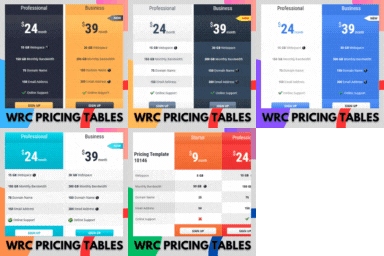
By Realwebcare
Responsive CSS3 pricing tables design to present features and prices of different products. Display pricing tables or comparison table by shortcode.

By Elementor
The Elementor Website Builder has it all: drag and drop page builder, Atomic Editor, pixel perfect design, global and reusable style systems, mobile r …

By David Anderson / Team Updraft
Get caching and more with this powerful cache plugin. Cache, optimize images, clean your database and minify for maximum performance.

By Florian Eickhorst
Show your Advanced Custom Fields (ACF) in columns for posts, pages, taxonomies, and users in the Wordpress admin backend.

By WP Chill
Let your admin menu breathe.

By HT Plugins
JustTables is a Product Tables plugin for WooCommerce.
WooCommerce Active Products Tables (former name WOOT) - is the WooCommerce Products Table plugin displaying shop products in table format

By KeystrokeClick
Protect admin accounts from being deleted or modified by other users. This plugin will always be hidden from all users other than the admin who instal …
Responsive pricing tables and comparison tables with a drag-and-drop builder. Templates, badges, icons and buttons included.
CHOOSE WHAT YOUR WEBSITE NEEDS
Start with the task you need to solve. Compare features, WordPress and PHP requirements, update history and the author’s documentation. Test changes on a private copy and avoid adding several plugins for the same job.
This independent directory displays plugin information on WebFulHost and links to the official source. Packages are not mirrored or installed here. A plugin can include paid extensions or services with separate terms from its author.

