

Represent your data by symbols, such as bars, lines, or pie charts.
★ 4.8/5 (10)1,000+ active installations
- Version
- 1.2.1
- WordPress
- 6.5+
- PHP
- 7.4+
- Updated
- 17 Nov 2026
WORDPRESS RESOURCES
Explore public plugin information from the official WordPress.org directory. Compare what a plugin does, its requirements and update history before adding it to your website.
Explore WordPress hosting →2,773 matching plugins reported by WordPress.org · Page 2 of 50
Source: WordPress.org
Data refreshed 22 Nov 2026 14:38 UTC
Represent your data by symbols, such as bars, lines, or pie charts.

By Moris Papasmadov
Embed dynamic stock market charts from finviz.com

By wpdevart
WordPress organization chart plugin is a nice and handy tool for creating simple and nice organizational charts. If you have any suggestions about the …

By WPClever
Ultimate solution to manage WooCommerce product size charts.

By Ays Pro
Chartify is a powerful WordPress Chart Builder Plugin that will help you to create WordPress Graphs & Charts easily and quickly.

By VillaTheme
WooCommerce Size Chart lets customize and design size charts for specific products or categories, enhancing customer convenience and boosting sales.

By WPMU DEV - Your All-in-One WordPress Platform
Best WordPress form builder plugin. Create contact forms, payment forms & order forms with 1000+ integrations.

By QuantumCloud
Create AI Powered Charts, Graphs, and Dashboard with iChart. Create Dashboard from Googlesheets Graphs, charts to visualize data
By G Matta
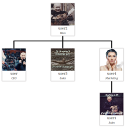
Drag-and-drop organization chart for WordPress. Display your team hierarchy with a shortcode.

By dFactory
Count and display post views, track site-wide visits, and see what content works – inside WordPress. Fast, easy to use and privacy-first.
Extend Elementor with 68+ widgets, 114 prebuilt demos, Mega Menu Builder, Theme Builder, and advanced interactive effects.
90+ Elementor widgets & addons, 600+ templates, Mega Menu, WooCommerce, Display Conditions. The only Elementor addon AI agents can fully build with.
CHOOSE WHAT YOUR WEBSITE NEEDS
Start with the task you need to solve. Compare features, WordPress and PHP requirements, update history and the author’s documentation. Test changes on a private copy and avoid adding several plugins for the same job.
This independent directory displays plugin information on WebFulHost and links to the official source. Packages are not mirrored or installed here. A plugin can include paid extensions or services with separate terms from its author.

