
Instant CSS
By dylanblokhuis
Write your styles beautifully with the power of Visual Studio Code
★ 4.9/5 (15)3,000+ active installations
- Version
- 1.2.2
- Updated
- 21 Sep 2023
WORDPRESS RESOURCES
Explore public plugin information from the official WordPress.org directory. Compare what a plugin does, its requirements and update history before adding it to your website.
Explore WordPress hosting →57 matching plugins reported by WordPress.org · Page 2 of 5
Source: WordPress.org
Data refreshed 21 Nov 2026 07:42 UTC
By dylanblokhuis
Write your styles beautifully with the power of Visual Studio Code

By Jaswant Singh
Protect your site from bad bots, manage allow/deny for search engines, AI crawlers, and more.

By adnan.limdi
Tracks visits via dual-layer detection, classifies human vs AI crawlers, and delivers high-precision offline geolocation analytics.
AI Rank Suite shows whether AI assistants name your site, and fixes what stops them: llms.txt, AI page scores, schema and classic SEO.
By Jeroen Sormani
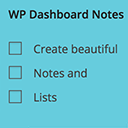
Working with multiple persons on a website? Want to make notes? You can do just that with WP Dashboard Notes. Create beautiful notes with a nice user …
Its own robots.txt for a single site or for every site of a multisite network – edited in the admin or deployed as a file.

By artiosmedia
Comprehensive performance optimization: page caching, cache warmup, CSS/JS minification, defer/async loading, and intelligent .htaccess management.

By andrewmurray
Broken link checker and SEO audit in one dashboard: missing meta descriptions, broken YouTube embeds, duplicate H1s, orphan posts and mixed content.

By teamgate
Automate generation of leads to Teamgate CRM by creating contacts, subscriptions or other kind of forms within your WordPress website.

By LeadConnector
Connect WordPress to LeadConnector for chat widgets, funnels, forms, calendars, reviews, custom values, and CRM tools.

By Alex Kirk
A self-hosted social reader for WordPress: follow people via RSS and ActivityPub, with multiple themes and a plugin ecosystem.

By colorlibplugins
Customize your WordPress login page with live preview. Change logo, background, colors, and form styling without coding.
CHOOSE WHAT YOUR WEBSITE NEEDS
Start with the task you need to solve. Compare features, WordPress and PHP requirements, update history and the author’s documentation. Test changes on a private copy and avoid adding several plugins for the same job.
This independent directory displays plugin information on WebFulHost and links to the official source. Packages are not mirrored or installed here. A plugin can include paid extensions or services with separate terms from its author.