

Schema Gallery
By schemagallery
AI-friendly gallery plugin with automatic JSON-LD ImageObject schema markup for better SEO and search visibility.
10+ active installations
- Version
- 1.7.3
- WordPress
- 6.2+
- PHP
- 8.1+
- Updated
- 28 Oct 2026
WORDPRESS RESOURCES
Explore public plugin information from the official WordPress.org directory. Compare what a plugin does, its requirements and update history before adding it to your website.
Explore WordPress hosting →37 matching plugins reported by WordPress.org · Page 2 of 4
Source: WordPress.org
Data refreshed 25 Nov 2026 07:53 UTC
By schemagallery
AI-friendly gallery plugin with automatic JSON-LD ImageObject schema markup for better SEO and search visibility.
Optimize and tweak WordPress by disable unused features. Improve performance, SEO and security using Clearfy — super easy, fast and zero code.
Optimize images automatically — compress, resize and convert to WebP, AVIF & more with Kraken.io. Faster pages, smaller files, same quality.
Lens has it all: unlimited folders, drag-and-drop, role-based permissions, smart search, and more. Get organized now!

By iLovePDF
Protect your images with automatic, easy-to-use watermarking.

By Bruno Kos
Multilingual WordPress: any number of languages, an address for each, Elementor, Bricks, WooCommerce, forms and SEO. Translate with your own API key.
By miabou
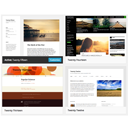
Select different Themes for one or more WordPress Pages, Posts or other non-Admin pages. Or Site Home.

By UserWay
Add a professional accessibility toolbar to your WordPress site and make it easier for users with disabilities.

By One Designs
Use any image from your WordPress Media Library as a custom user avatar or user profile picture. Add your own Default Avatar.

By gm_alex
With the "User Access Manager"-plugin you can manage the access to your posts, pages and files.

By tychesoftwares
WP Content Copy Protection uses aggressive techniques in protecting your online content (text/source/images/video/audio) from being stolen.
The ultimate WordPress translation solution with built-in language translator. Create multilingual content, switch languages, and translate your entir …
CHOOSE WHAT YOUR WEBSITE NEEDS
Start with the task you need to solve. Compare features, WordPress and PHP requirements, update history and the author’s documentation. Test changes on a private copy and avoid adding several plugins for the same job.
This independent directory displays plugin information on WebFulHost and links to the official source. Packages are not mirrored or installed here. A plugin can include paid extensions or services with separate terms from its author.



