Auto Complete orders for virtual-downloadable products after a successful payment or predefine status.
★ 5.0/5 (4)4,000+ active installations
- Version
- 1.2.2
- WordPress
- 5.3+
- PHP
- 7.4+
- Updated
- 20 Nov 2026
View plugin details ↗Schedule and automate changes to your WordPress posts. Unpublish, expire, change status or categories, and build workflows with multiple steps.
★ 4.5/5 (173)100,000+ active installations
- Version
- 4.12.0
- WordPress
- 6.8+
- PHP
- 8.2+
- Updated
- 24 Nov 2026
View plugin details ↗If WP-Cron runs important things for you, you better make sure WP-Cron always runs!
★ 3.5/5 (8)5,000+ active installations
- Version
- 1.3.1
- WordPress
- 5.1+
- PHP
- 7.0+
- Updated
- 20 Oct 2026
View plugin details ↗Easy Drag & Drop Page Builder. A complete solution to create a WordPress Website, Custom Themes, Landing Pages, Coming Soon & Maintenance Mode Pages.
★ 4.9/5 (4,699)600,000+ active installations
- Version
- 6.20.13
- WordPress
- 5.0+
- PHP
- 5.6+
- Updated
- 17 Nov 2026
View plugin details ↗Displays a customizable loading screen with progress percentage while your website finishes loading, hiding unrendered content.
★ 4.6/5 (124)10,000+ active installations
- Version
- 1.2.9
- WordPress
- 3.0.6+
- Updated
- 10 Nov 2026
View plugin details ↗Easy Drag & Drop Page Builder that adds a splash page to your site that it's perfect for a coming soon page, maintenance or landing page.
★ 4.3/5 (876)400,000+ active installations
- Version
- 2.6.26
- WordPress
- 4.7+
- PHP
- 7.1+
- Updated
- 13 Nov 2026
View plugin details ↗Automate WooCommerce order statuses. Beautifully.
★ 5.0/5 (11)2,000+ active installations
- Version
- 3.9.6
- WordPress
- 4.8+
- PHP
- 7.4+
- Updated
- 20 Nov 2026
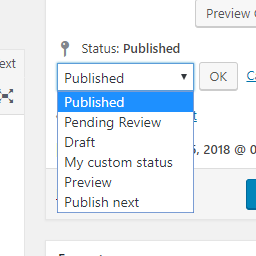
View plugin details ↗Add new statuses to all post types (posts, pages, products, ...).
★ 4.5/5 (11)1,000+ active installations
- Version
- 1.1.1
- WordPress
- 5.0+
- PHP
- 7.2+
- Updated
- 1 Sep 2026
View plugin details ↗Firewall, Malware Scanner, Two Factor Auth, and Comprehensive Security Features, powered by our 24-hour team. Make security a priority with Wordfence.
★ 4.7/5 (5,057)5,000,000+ active installations
- Version
- 9.1.1
- WordPress
- 4.7+
- PHP
- 7.0+
- Updated
- 10 Nov 2026
View plugin details ↗Get a tree view of all your pages directly in the admin menu. Search, add, edit, view, re-order – all is just one click away!
★ 4.6/5 (48)10,000+ active installations
- Version
- 2.8.11
- WordPress
- 4.9+
- PHP
- 7.0+
- Updated
- 12 Sep 2026
View plugin details ↗Manage order statuses in WooCommerce. Beautifully.
★ 5.0/5 (3)800+ active installations
- Version
- 2.0.1
- WordPress
- 4.7+
- PHP
- 7.4+
- Updated
- 20 Nov 2026
View plugin details ↗Nested Pages provides a drag and drop interface for managing pages & posts in the WordPress admin, while maintaining quick edit functionality.
★ 4.7/5 (126)90,000+ active installations
- Version
- 3.3.6
- WordPress
- 3.8+
- PHP
- 8.0+
- Updated
- 24 Nov 2026
View plugin details ↗