

BlockStrap Page Builder - Bootstrap Blocks combines Bootstrap's power with the block editor's versatility.
★ 4.5/5 (4)2,000+ active installations
- Version
- 0.1.66
- WordPress
- 6.0+
- PHP
- 7.2+
- Updated
- 20 Nov 2026
WORDPRESS RESOURCES
Explore public plugin information from the official WordPress.org directory. Compare what a plugin does, its requirements and update history before adding it to your website.
Explore WordPress hosting →3,492 matching plugins reported by WordPress.org · Page 20 of 50
Source: WordPress.org
Data refreshed 24 Nov 2026 13:39 UTC
BlockStrap Page Builder - Bootstrap Blocks combines Bootstrap's power with the block editor's versatility.

By Haktan Suren
The simplest way to collect leads from your comments to ActiveCampaign.

By Ryan Welcher
Transform your Query Loop blocks into powerful, flexible content engines! 🚀
JetHost Total Care simplifies WordPress management by consolidating features like security, site enhancements and performance into a single plugin.

By pgn4web
Allows for the insertion of a chessboard displaying chess games within wordpress articles.

By Wasiliy Strecker / ContestGallery developer
Create photo and media galleries with uploads, voting and product sales through PayPal or Stripe.
By Ron Fredericks
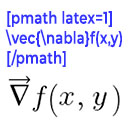
Render mathematical equations in WordPress as PNG images using pmath native syntax or LaTeX input with server-side rendering.

By yo35
This plugin allows you to typeset and display chess diagrams and PGN-encoded chess games.

By Fernando Tellado
Free EU consumer-rights toolkit: withdrawal function, harmonised legal guarantee notice (GARAN), checkout consents, Article 16 exclusions.

By cigan1
A fast, privacy-first Disqus alternative for WordPress: threaded comments, reactions, and ML spam filtering. No ads, no tracking, no data resale.
AJAX login, registration and password reset in a popup or on a page. Gutenberg blocks, skins, redirects and a setup guide.

By David Gwyer
Build a responsive HTML sitemap in the block editor with live preview, flexible sorting, tabs, and shortcode support.
CHOOSE WHAT YOUR WEBSITE NEEDS
Start with the task you need to solve. Compare features, WordPress and PHP requirements, update history and the author’s documentation. Test changes on a private copy and avoid adding several plugins for the same job.
This independent directory displays plugin information on WebFulHost and links to the official source. Packages are not mirrored or installed here. A plugin can include paid extensions or services with separate terms from its author.

