

RTMForm For Elementor Plugin is an Form Builder for Elementor, and Widget Ready to use.
★ 4.3/5 (14)30,000+ active installations
- Version
- 1.2.8
- WordPress
- 6.8+
- PHP
- 8.2+
- Updated
- 15 Oct 2026
WORDPRESS RESOURCES
Explore public plugin information from the official WordPress.org directory. Compare what a plugin does, its requirements and update history before adding it to your website.
Explore WordPress hosting →3,943 matching plugins reported by WordPress.org · Page 20 of 50
Source: WordPress.org
Data refreshed 24 Nov 2026 00:01 UTC
RTMForm For Elementor Plugin is an Form Builder for Elementor, and Widget Ready to use.

Web Accessibility (formally known as Ally) is a free, powerful, and user-friendly plugin that helps WordPress creators build more accessible websites …

By Property Hive
Building a property website? Property Hive has everything you need to get started, and so much more.

By Weblizar - WordPress Themes & Plugin
Customize Your WordPress Login Screen Amazingly - Add Own Logo, Add Social Profiles, Login Form Positions, Background Image Slide Show
Add a text before and after the product price both globally and individually. Also, apply a quick discount for your products.

By Aurovrata Venet
Pure CSS responsive grid layouts for contact form 7. It enables rich interlinking of your CMS data via taxonomy/posts populated dropdown fields.

By FARAZFRANK
Build a responsive filter gallery for your portfolio. Organize images with filters in a stunning grid or masonry layout easily.

By mofis
Style Contact Form 7 lets you visually design Contact Form 7 forms in the block editor with live styling controls.

By shahadul878
An easy way to manage common PHP INI settings and WordPress debugging constants from the WordPress admin panel.
By Graham
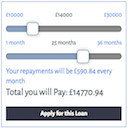
A simple repayment calculator. Uses sliders to set the amount and term and displays a range of outputs

By IdeaBox Creations
40+ free Elementor widgets plus extensions: form stylers for Contact Form 7, WPForms and Gravity Forms, Instagram feed, display conditions, templates.

By ThemeHigh
Enable faster PayPal checkout for WooCommerce with Smart Buttons, Pay Later, eligible card and local payments, with WooCommerce Blocks compatibility.
CHOOSE WHAT YOUR WEBSITE NEEDS
Start with the task you need to solve. Compare features, WordPress and PHP requirements, update history and the author’s documentation. Test changes on a private copy and avoid adding several plugins for the same job.
This independent directory displays plugin information on WebFulHost and links to the official source. Packages are not mirrored or installed here. A plugin can include paid extensions or services with separate terms from its author.
