

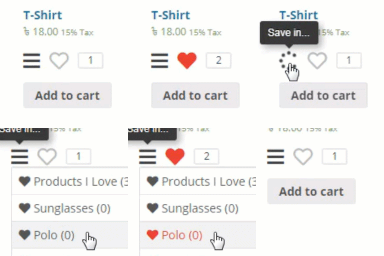
Qode Wishlist for WooCommerce plugin is the ideal toolkit for letting your visitors save & share comprehensive lists with their products of interest.
★ 5.0/5 (2)10,000+ active installations
- Version
- 1.3.0
- WordPress
- 6.3+
- PHP
- 7.4+
- Updated
- 4 Nov 2026
WORDPRESS RESOURCES
Explore public plugin information from the official WordPress.org directory. Compare what a plugin does, its requirements and update history before adding it to your website.
Explore WordPress hosting →783 matching plugins reported by WordPress.org · Page 21 of 50
Source: WordPress.org
Data refreshed 26 Nov 2026 09:03 UTC
Qode Wishlist for WooCommerce plugin is the ideal toolkit for letting your visitors save & share comprehensive lists with their products of interest.

By oneteamsoftware
Speed up WordPress by offloading media to Cloudflare R2, Amazon S3, Google Cloud & 7 more. Zero egress fees. Migrate from WP Offload Media in one …

By Wavesy
Let readers summarize any post in ChatGPT, Claude, Gemini, Perplexity or Grok with one click. No API keys, no AI costs, by Wavesy.

By WANotifier
Send WhatsApp notifications from Contact Form 7, Gravity Forms, WPForms, and 6 more form plugins using WhatsApp Business API
Floating Social Media Icons, Sticky Share Buttons, Facebook Feeds, & Popup builder. Also, create Call, Email, SMS, & Contact buttons to increa …
Connect Dropbox or Google Drive and create beautiful photo and video galleries — fast downloads, favorites, password protection. Sell prints with Pro.
By PickPlugins
Add wishlist feature to your WooCommerce product or any post types.
A lightweight social sharing plugin for showing social networks when users highlight text, share images, headlines, or use Click to Share.
Customize link attributes, such as nofollow links, remove noreferrer, add icons to indicate external links
Build social proof with authentic text & video testimonials for WooCommerce. Showcase reviews in galleries or share them on social media.
WooCommerce refund and returns process made simple. Let your customers request a refund and return products directly from the My Account page.

By WP Zone
Save, store and import layouts instantly, all in one place with the click of a button!
CHOOSE WHAT YOUR WEBSITE NEEDS
Start with the task you need to solve. Compare features, WordPress and PHP requirements, update history and the author’s documentation. Test changes on a private copy and avoid adding several plugins for the same job.
This independent directory displays plugin information on WebFulHost and links to the official source. Packages are not mirrored or installed here. A plugin can include paid extensions or services with separate terms from its author.





