

PublishRank
By umarjaum
SEO tools for news publishers: News SEO, sitemaps, schema, metadata, redirects, and technical controls.
★ 4.0/5 (1)0+ active installations
- Version
- 2.26.2
- WordPress
- 6.3+
- PHP
- 7.4+
- Updated
- 24 Nov 2026
WORDPRESS RESOURCES
Explore public plugin information from the official WordPress.org directory. Compare what a plugin does, its requirements and update history before adding it to your website.
Explore WordPress hosting →359 matching plugins reported by WordPress.org · Page 21 of 30
Source: WordPress.org
Data refreshed 28 Nov 2026 09:19 UTC
By umarjaum
SEO tools for news publishers: News SEO, sitemaps, schema, metadata, redirects, and technical controls.
A complete toolkit to build stunning product configurators in WordPress and WooCommerce. Boost sales and increase user engagement.

By hashthemes
Hash Form Builder is a free drag & drop form builder for WordPress. Build contact forms, surveys, quotes and bookings with no code.

By Jan-Hendrik von Storetown-Media
Distraction-free WooCommerce checkout with the German and EU legal essentials built in. Works with your gateways, theme and Germanized.

By sparkcoreio
Page cache and performance plugin that tests every optimization on your own pages first, so speed fixes never break your menus, forms or checkout.

By RankFlect SEO
Finds vulnerabilities in your whole stack, from PHP and the database to plugins and exposed files, and explains each fix in plain language.
By Ron Fredericks
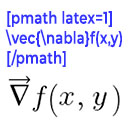
Render mathematical equations in WordPress as PNG images using pmath native syntax or LaTeX input with server-side rendering.

By odysseynewmedia
The complete AI control panel for WordPress. Generate llms.txt, Markdown, and JSONL. Includes AI Analytics and Content Cleaning.
Premium Blocks for Gutenberg: Free Gutenberg blocks packed with performance-optimized tools, global styling options, responsive controls, pre-built te …
A collection of dynamic post blocks to quickly build stunning news, magazine, and blog websites.
The best WordPress plugin for displaying related posts. Simple and flexible, with a powerful proven algorithm and inbuilt caching.

By Keyideas Infotech Private Limited
3D jewelry configurator for WooCommerce: shoppers design rings, necklaces and bracelets in a real-time 3D preview and add the finished piece to the ca …
CHOOSE WHAT YOUR WEBSITE NEEDS
Start with the task you need to solve. Compare features, WordPress and PHP requirements, update history and the author’s documentation. Test changes on a private copy and avoid adding several plugins for the same job.
This independent directory displays plugin information on WebFulHost and links to the official source. Packages are not mirrored or installed here. A plugin can include paid extensions or services with separate terms from its author.



