

Grid Landing Page Editor
By Palasthotel GmbH
Grid is a containerist landingpage editor.
★ 3.8/5 (4)60+ active installations
- Version
- 3.0.2
- WordPress
- 6.1+
- PHP
- 8.2+
- Updated
- 19 Oct 2026
WORDPRESS RESOURCES
Explore public plugin information from the official WordPress.org directory. Compare what a plugin does, its requirements and update history before adding it to your website.
Explore WordPress hosting →8,873 matching plugins reported by WordPress.org · Page 21 of 50
Source: WordPress.org
Data refreshed 22 Nov 2026 17:55 UTC
By Palasthotel GmbH
Grid is a containerist landingpage editor.

By Łukasz Nowicki
Add custom CSS to individual posts, pages, or WooCommerce products, with optional archive support and a dedicated code editor.

By WordPress.org
Opt-in AI for WordPress: one stable feature plus experiments that may change or be removed. Needs an AI provider plugin and your own API key.

By WP Chill
An easy-to-use testimonial plugin to collect and show customer feedback in WordPress

By Graffino
Clear floats in one click: a button for the Classic Editor and a Clear floats block for the Block Editor.
GT3 Image Gallery - create photo gallery, video gallery, block gallery, slider and more with ease. All photo galleries are responsive and loading fast

By Diego Pereira
Filterable portfolio and image gallery for Gutenberg, Elementor and shortcodes. Start from a ready-made template and publish in minutes.

By averta
Build Stunning Slider and Popup. Exit intent Popup, Image slider carousel, video slider carousel, post slider carousel, product slider, promote popup

By David Vongries
Replace the default dashboard widgets with your own, customize the login screen, change the login URL & clean up the WordPress admin area.

By Brice Capobianco
This tiny plugin re-adds the Editor text underline & text justify buttons in the WYSIWYG removed in WordPress 4.7.0

By Hannes Etzelstorfer
All in one email template designer for WooCommerce, Ninja Forms, Elementor Forms, Gravity Forms, CF7, Support Plus, EDD, ...
By prismtechstudios
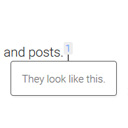
Add inline footnotes to your posts. On desktop, the footnotes will appear as tooltips. On mobile, the footnote will expand beneath the text.
CHOOSE WHAT YOUR WEBSITE NEEDS
Start with the task you need to solve. Compare features, WordPress and PHP requirements, update history and the author’s documentation. Test changes on a private copy and avoid adding several plugins for the same job.
This independent directory displays plugin information on WebFulHost and links to the official source. Packages are not mirrored or installed here. A plugin can include paid extensions or services with separate terms from its author.
