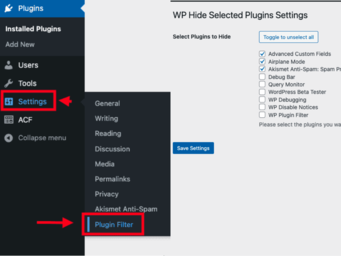
WP Plugin Filter lets you easily hide unnecessary plugins from the WordPress admin dashboard, streamlining plugin management.
★ 5.0/5 (1)20+ active installations
- Version
- 1.3.1
- WordPress
- 6.3+
- PHP
- 7.0+
- Updated
- 20 Jun 2026
View plugin details ↗
By David Anderson / Team Updraft
Redux is a simple, truly extensible, and fully responsive options framework for WordPress themes and plugins. It ships with an integrated demo.
★ 4.4/5 (273)900,000+ active installations
- Version
- 4.5.18
- WordPress
- 5.3+
- PHP
- 7.4+
- Updated
- 9 Nov 2026
View plugin details ↗Removes unused scripts (emoji, jquery-migrate, comment-reply) and cleans unnecessary metadata from the head.
★ 4.0/5 (4)200+ active installations
- Version
- 1.0.11
- WordPress
- 6.0+
- PHP
- 7.0+
- Updated
- 26 Jul 2026
View plugin details ↗Nova Poshta, Ukrposhta, Rozetka and Nova Global in one plugin. Shipping labels (TTN) right from orders, block checkout, no third-party sign-up.
★ 4.9/5 (29)1,000+ active installations
- Version
- 1.16.2
- WordPress
- 5.0+
- PHP
- 7.4+
- Updated
- 19 Nov 2026
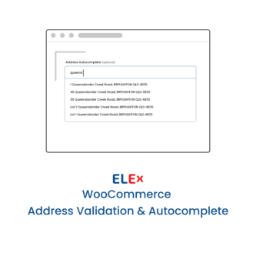
View plugin details ↗Simple and easy to use address validation & google address autocomplete plugin. Uses EasyPost, UPS, USPS, AddressFinder & Google APIs.
★ 4.2/5 (10)700+ active installations
- Version
- 1.8.8
- WordPress
- 3.0.1+
- Updated
- 19 Nov 2026
View plugin details ↗
By David Anderson / Team Updraft
Provides a facility for distributing updates and handling licences and renewal reminders for your own WordPress plugins
★ 5.0/5 (5)20+ active installations
- Version
- 1.12.4
- WordPress
- 5.5+
- PHP
- 7.4+
- Updated
- 18 Nov 2026
View plugin details ↗Your comprehensive solution for creating dynamic and feature-rich real estate websites on WordPress. Designed to cater to the diverse needs of real es …
★ 4.7/5 (203)1,000+ active installations
- Version
- 5.5.0
- WordPress
- 6.2+
- PHP
- 7.4+
- Updated
- 12 Nov 2026
View plugin details ↗The best free Google Analytics plugin for WordPress. See how visitors find and use your website so you can grow your business with powerful analytics.
★ 4.5/5 (3,161)2,000,000+ active installations
- Version
- 11.3.0
- WordPress
- 5.6.0+
- PHP
- 7.2+
- Updated
- 16 Sep 2026
View plugin details ↗Display TikTok videos on your WordPress site with a customizable option. No coding needed. Works with Elementor, Oxygen, and Beaver Builder.
★ 4.0/5 (1)1,000+ active installations
- Version
- 1.2.7
- WordPress
- 6.2+
- PHP
- 7.4+
- Updated
- 20 Nov 2026
View plugin details ↗Advanced form builder plugin for Gutenberg. Create forms from the ground up, customize the existing ones, and style them up – all in one editor.
★ 4.1/5 (73)80,000+ active installations
- Version
- 3.6.8.2
- WordPress
- 6.1+
- PHP
- 7.0+
- Updated
- 16 Nov 2026
View plugin details ↗This plugin disables email notifications for auto-updates and blocks updates for specific plugins, hide plugins, WordPress core, and themes.
★ 5.0/5 (2)4,000+ active installations
- Version
- 1.0.5
- WordPress
- 5.5+
- PHP
- 7.0+
- Updated
- 1 Sep 2026
View plugin details ↗WPC Product Bundles is a plugin that helps you bundle a few products, offer them at a discount, and watch the sales go up!
★ 4.4/5 (220)30,000+ active installations
- Version
- 8.8.0
- WordPress
- 5.9+
- Updated
- 11 Nov 2026
View plugin details ↗