

Popups for Divi
By Tim Strifler
A quick and easy way to create Popup layers inside the Divi Visual Builder!
★ 4.8/5 (442)100,000+ active installations
- Version
- 3.2.9
- WordPress
- 4.0.0+
- PHP
- 7.0+
- Updated
- 28 Oct 2026
WORDPRESS RESOURCES
Explore public plugin information from the official WordPress.org directory. Compare what a plugin does, its requirements and update history before adding it to your website.
Explore WordPress hosting →10,000 matching plugins reported by WordPress.org · Page 22 of 50
Source: WordPress.org
Data refreshed 21 Nov 2026 12:14 UTC
By Tim Strifler
A quick and easy way to create Popup layers inside the Divi Visual Builder!
By Denis Botić
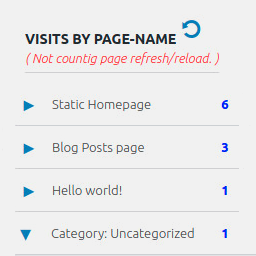
Display number of visits for each page in admin dashboard and browser developer-tool/console. Doesn't count page refresh as a new visit...
Launch and grow your email marketing effortlessly with Hostinger Reach. Collect contacts, sync subscribers, and send emails – all in one, AI powered.

By John Blackbourn
Query Monitor is the developer tools panel for WordPress and WooCommerce.
Secure WordPress MCP server: we never see your data. Connect Claude, ChatGPT & AI agents to WordPress. 280+ tools for WooCommerce, SEO & GA4. Free.
Build membership sites with tiered plans, content restriction, drag-&-drop custom registration & login form builder, and built-in payment system.

By Mark Howells-Mead
Adds a new column to the WordPress admin post list view, containing a preview of the post's featured image (where available).

By Logtivity Activity Logs
Logtivity is the activity log service for WordPress admins. Track user activity and site events across every WordPress site you maintain.

By John Havlik
Adds breadcrumb navigation showing the visitor's path to their current location.

By Ryan Hellyer
Disable the WordPress emoji functionality to improve performance and privacy.

By Megiston
Moves admin notices into a bell panel in the admin bar. Nothing stored, nothing lost: success messages and inline notices stay where they are.

By echoplugins
Show IDs on admin pages for posts, pages, categories, taxonomies, custom post types and more.
CHOOSE WHAT YOUR WEBSITE NEEDS
Start with the task you need to solve. Compare features, WordPress and PHP requirements, update history and the author’s documentation. Test changes on a private copy and avoid adding several plugins for the same job.
This independent directory displays plugin information on WebFulHost and links to the official source. Packages are not mirrored or installed here. A plugin can include paid extensions or services with separate terms from its author.


