Show finished projects as case studies with client, dates, value and project links in a grid, slider or list. No coding needed.
★ 5.0/5 (6)200+ active installations
- Version
- 3.0.5
- WordPress
- 6.0+
- PHP
- 7.4+
- Updated
- 3 Nov 2026
WORDPRESS RESOURCES
Explore public plugin information from the official WordPress.org directory. Compare what a plugin does, its requirements and update history before adding it to your website.
Explore WordPress hosting →1,760 matching plugins reported by WordPress.org · Page 22 of 50
Source: WordPress.org
Data refreshed 21 Nov 2026 10:56 UTC
Show finished projects as case studies with client, dates, value and project links in a grid, slider or list. No coding needed.

By jgwhite33
Display Yelp business reviews in a fast WordPress slider or grid with a summary badge and review photos. Multi-location support; stored locally.

By Kalmang
Dynamic Widgets gives you full control on which pages a widget will display. It lets you dynamicly show or hide widgets on WordPress pages.
Build a powerful Knowledge Base, Help Center, Wiki, or Documentation Site.

By Saad Iqbal
Gutena Tabs is a simple and easy-to-use WordPress plugin which allows you to create beautiful tabs in your posts and pages.

By peachpay
Display random related products in a slider based on product category, tag, or attribute on every product page.

By systemsrtk
Duplicate taxonomy terms including all meta data and relationships with a single click.

By iworks (Marcin Pietrzak)
Supports the grammar rule for orphan words at the end of a line.
By tharkun69
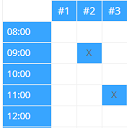
Create configurable occupancy schedules and let visitors view, request and manage bookings directly in the WordPress frontend.

By Michael Sablone
Serve clean Markdown versions of WordPress posts, pages, and custom post types for AI agents, LLM tools, and content pipelines.

By Jose Mortellaro
It collects some useful information about the website (number of posts, server environment, active plugins...).

By Mateusz Gbiorczyk
Set custom friendly permalinks structure: Custom Post Type > Taxonomy > Post and Custom Post Type > Taxonomy instead of default WordPress structure.
CHOOSE WHAT YOUR WEBSITE NEEDS
Start with the task you need to solve. Compare features, WordPress and PHP requirements, update history and the author’s documentation. Test changes on a private copy and avoid adding several plugins for the same job.
This independent directory displays plugin information on WebFulHost and links to the official source. Packages are not mirrored or installed here. A plugin can include paid extensions or services with separate terms from its author.