
Wishlist
By PickPlugins
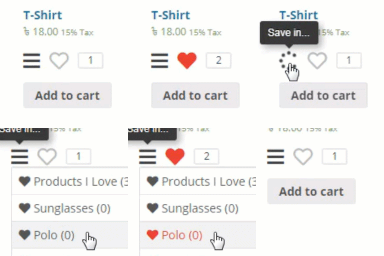
Add wishlist feature to your WooCommerce product or any post types.
★ 3.8/5 (13)300+ active installations
- Version
- 1.0.46
- WordPress
- 3.8+
- Updated
- 8 Jun 2026
WORDPRESS RESOURCES
Explore public plugin information from the official WordPress.org directory. Compare what a plugin does, its requirements and update history before adding it to your website.
Explore WordPress hosting →3,407 matching plugins reported by WordPress.org · Page 22 of 50
Source: WordPress.org
Data refreshed 28 Nov 2026 03:53 UTC
By PickPlugins
Add wishlist feature to your WooCommerce product or any post types.
Optimize and tweak WordPress by disable unused features. Improve performance, SEO and security using Clearfy — super easy, fast and zero code.

By Smackcoders Inc.,
The best WordPress Import Export plugin. Easily import and export posts, pages, CPTs, WooCommerce products, users and more using CSV, XML and Excel.

By grandranker
Automatically publish and update SEO articles from Grandranker with images, categories, metadata, and structured data.

By theme funda
Product Table, Grid, List Builder For WooCommerce lets you build unlimited, reusable product displays for your WooCommerce store — no coding required.

All-in-one toolkit for Elementor: advanced addons, theme builder, forms, icons & templates to build stunning sites fast and easy.

By f1logic
Publish posts automatically to Facebook page.

By Felix Arntz
This plugin adds categories and tags to the WordPress media library - lightweight and developer-friendly.

Import WooCommerce products, orders, coupons, customers, and reviews from CSV, XML, or Excel files. An add-on for WP Ultimate CSV Importer.
This Social Share Plugin adds advanced social media sharing buttons to your WordPress sites, such as Facebook, WhatsApp, X, LinkedIn, & Pinterest.

By Tim Strifler
Exclusive Addons is one of the Best Elementor Addons With 90+ Elementor Free & Pro Widgets with all the customizations options you ever imagined.
Create unlimited notifications, announcements, or notices for your visitors
CHOOSE WHAT YOUR WEBSITE NEEDS
Start with the task you need to solve. Compare features, WordPress and PHP requirements, update history and the author’s documentation. Test changes on a private copy and avoid adding several plugins for the same job.
This independent directory displays plugin information on WebFulHost and links to the official source. Packages are not mirrored or installed here. A plugin can include paid extensions or services with separate terms from its author.


