Qi Addons for Elementor is a comprehensive library of 60+ custom, flexible & easily styled Elementor widgets developed by Qode Interactive.
★ 4.8/5 (205)200,000+ active installations
- Version
- 1.11.3
- WordPress
- 5.0+
- PHP
- 5.6+
- Updated
- 24 Nov 2026
View plugin details ↗An email marketing tool for your blog: subscription forms to create your lists with unlimited subscribers and newsletters.
★ 4.6/5 (1,205)200,000+ active installations
- Version
- 9.5.8
- WordPress
- 6.1+
- PHP
- 7.0+
- Updated
- 23 Nov 2026
View plugin details ↗Target menu items by role, device, schedule, and campaign rules using a fast, native conditions interface inside the menu editor.
★ 5.0/5 (1)10+ active installations
- Version
- 2.0.1
- WordPress
- 6.6+
- PHP
- 8.0+
- Updated
- 25 Nov 2025
View plugin details ↗A powerful WordPress plugin for full URL control. Set custom permalinks, auto-redirects, and use dynamic tags for ideal site structure and SEO.
★ 4.1/5 (116)100,000+ active installations
- Version
- 3.3.3
- WordPress
- 5.9+
- PHP
- 7.4+
- Updated
- 13 Oct 2026
View plugin details ↗Run your restaurant on WordPress — menus & allergens, online ordering, table bookings and card payments. Commission-free, no monthly fees.
★ 5.0/5 (3)50+ active installations
- Version
- 1.2.38
- WordPress
- 6.0+
- PHP
- 7.4+
- Updated
- 19 Nov 2026
View plugin details ↗Collect, manage, and display customer reviews with testimonial sliders, carousels, grids, lists, and review forms. Build with AI or ready patterns.
★ 4.7/5 (226)40,000+ active installations
- Version
- 4.1.2
- WordPress
- 6.3+
- PHP
- 7.4+
- Updated
- 10 Nov 2026
View plugin details ↗PowerPack Lite for Beaver Builder extends Beaver Builder with custom options, unique modules and templates.
★ 5.0/5 (243)6,000+ active installations
- Version
- 1.3.3
- WordPress
- 4.6+
- PHP
- 7.4+
- Updated
- 17 Nov 2026
View plugin details ↗Empower customers to select their preferred delivery or pickup time using a convenient datetime picker integrated into the WooCommerce checkout page.
★ 5.0/5 (30)500+ active installations
- Version
- 2.0.1
- WordPress
- 6.6+
- PHP
- 7.4+
- Updated
- 22 Nov 2026
View plugin details ↗Duplicate post
★ 4.9/5 (1,634)300,000+ active installations
- Version
- 1.5.8
- WordPress
- 4.6+
- PHP
- 5.6+
- Updated
- 10 Nov 2026
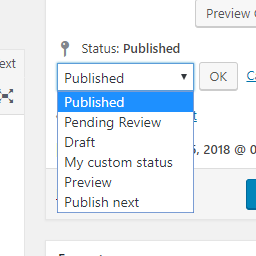
View plugin details ↗Add new statuses to all post types (posts, pages, products, ...).
★ 4.5/5 (11)1,000+ active installations
- Version
- 1.1.1
- WordPress
- 5.0+
- PHP
- 7.2+
- Updated
- 1 Sep 2026
View plugin details ↗A customizable plugin to create and manage WooCommerce product tabs and WordPress tabs to organize content.
★ 4.9/5 (134)10,000+ active installations
- Version
- 3.1.9
- WordPress
- 5.0+
- PHP
- 7.2+
- Updated
- 9 Nov 2026
View plugin details ↗Gantry is a comprehensive set of building blocks to enable the rapid development and realization of a design into a flexible and powerful web platform
★ 4.6/5 (34)7,000+ active installations
- Version
- 5.6.7
- WordPress
- 5.2+
- PHP
- 8.1.0+
- Updated
- 4 Nov 2026
View plugin details ↗