

This plugin provides a full set of easy-to-use and customizable WooCommerce shortcodes as Page builder addon.
★ 4.2/5 (5)1,000+ active installations
- Version
- 1.2.5
- WordPress
- 5.9+
- PHP
- 7.4+
- Updated
- 16 Nov 2026
WORDPRESS RESOURCES
Explore public plugin information from the official WordPress.org directory. Compare what a plugin does, its requirements and update history before adding it to your website.
Explore WordPress hosting →10,000 matching plugins reported by WordPress.org · Page 22 of 50
Source: WordPress.org
Data refreshed 20 Nov 2026 23:11 UTC
This plugin provides a full set of easy-to-use and customizable WooCommerce shortcodes as Page builder addon.

By Jose Mortellaro
It lets you set a custom post type as a front page.

By AsanaPlugins
WooCommerce Product Bundle help to creates Product Bundles, Composite Products, Mix and Match, BOGO deals, Offer gift products, and Assembled Products …
Formerly "Custom Facebook Feed". Display completely customizable Facebook feeds of a Facebook page. Supports Facebook oEmbeds.

B2BKing is the complete solution for running a Wholesale, B2B or B2B + B2C hybrid store with WooCommerce.
The Sucuri WordPress Security plugin is a security toolset for security integrity monitoring, malware detection and security hardening.

By add-ons.org
The Repeater Fields for Contact Form 7 allow you to create one or more sets of fields that can be repeated.

By A WP Life
Display your Flickr albums, photostream, and photos on any page or widget. Responsive and easy to set up using Flickr API.

By SuperPWA
SuperPWA helps you convert your WordPress website into a Progressive Web App instantly.
By scribu
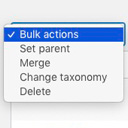
Allows you to merge terms, move terms between taxonomies, and set term parents, individually or in bulk.

By Trident Technolabs
Set Custom Shipping Rates For Different Cities On Woocommerce.

By fontawesome
The official way to use Font Awesome Free or Pro icons on your WordPress site, brought to you by the Font Awesome team.
CHOOSE WHAT YOUR WEBSITE NEEDS
Start with the task you need to solve. Compare features, WordPress and PHP requirements, update history and the author’s documentation. Test changes on a private copy and avoid adding several plugins for the same job.
This independent directory displays plugin information on WebFulHost and links to the official source. Packages are not mirrored or installed here. A plugin can include paid extensions or services with separate terms from its author.

