

WP Chosen
By John James Jacoby
Make long, unwieldy select boxes much more user-friendly.
★ 4.3/5 (6)70+ active installations
- Version
- 6.4.0
- WordPress
- 6.4+
- PHP
- 7.4+
- Updated
- 10 Oct 2026
WORDPRESS RESOURCES
Explore public plugin information from the official WordPress.org directory. Compare what a plugin does, its requirements and update history before adding it to your website.
Explore WordPress hosting →2,214 matching plugins reported by WordPress.org · Page 22 of 50
Source: WordPress.org
Data refreshed 22 Nov 2026 11:23 UTC
By John James Jacoby
Make long, unwieldy select boxes much more user-friendly.

By Amit Sharma
Create custom WordPress user roles, manage selected capabilities, and safely review every registered role from one dashboard.

By Marc Tönsing
SEO-friendly Table of Contents Gutenberg block. No JavaScript or CSS by default.

By wdonlinedk
See who is on your WordPress site right now and which pages they are viewing, directly from the WordPress dashboard.
By Denis Botić
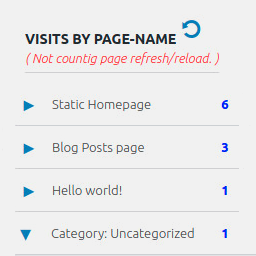
Display number of visits for each page in admin dashboard and browser developer-tool/console. Doesn't count page refresh as a new visit...
Free, simple cookieless website visitor tracking and traffic sources with human vs bot traffic split. Google Analytics alternative for WordPress.

By CreativeMindsSolutions
Block unwanted email registrations on your site with this email blacklist plugin. Protect your site by preventing spam sign-ups.

By Marc Armengou
Hardens WordPress with secure headers, login protection, user enumeration blocking, rate limiting, and a built-in security checklist.
Secure WordPress MCP server for Claude, ChatGPT, Codex & Cursor. Manage posts, WooCommerce, SEO, media, users, builders, LMS & events.

By Soflyy
Import posts from CSV files into WordPress.

By CreativeMindsSolutions
Add custom CSS and JavaScript to headers and footers on your site with the header and footer plugin for enhanced control and design.

By ablancodev
Automatic per-audience pricing for WooCommerce — discounts driven by WordPress roles, the Groups plugin and other membership sources.
CHOOSE WHAT YOUR WEBSITE NEEDS
Start with the task you need to solve. Compare features, WordPress and PHP requirements, update history and the author’s documentation. Test changes on a private copy and avoid adding several plugins for the same job.
This independent directory displays plugin information on WebFulHost and links to the official source. Packages are not mirrored or installed here. A plugin can include paid extensions or services with separate terms from its author.

