

WordPress security for Japanese sites: login protection, 2FA, file protection and malware scanning, each explained in clear Japanese.
★ 5.0/5 (2)90+ active installations
- Version
- 1.1.3
- WordPress
- 5.8+
- PHP
- 7.4+
- Updated
- 16 Nov 2026
WORDPRESS RESOURCES
Explore public plugin information from the official WordPress.org directory. Compare what a plugin does, its requirements and update history before adding it to your website.
Explore WordPress hosting →10,000 matching plugins reported by WordPress.org · Page 23 of 50
Source: WordPress.org
Data refreshed 22 Nov 2026 13:24 UTC
WordPress security for Japanese sites: login protection, 2FA, file protection and malware scanning, each explained in clear Japanese.

By ilyasine
Enable maintenance mode in one click with stunning animations and customizable access for specific users.
By Roland Murg
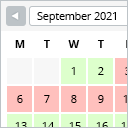
This booking calendar shows when something is booked or available. Use it to show when your holiday home is available for rent, for example.

By Janis Elsts
Lets you edit the WordPress admin menu. You can re-order, hide or rename menus, add custom menus and more.
Block spam comments, defend against login attacks, strengthen site security. Anti-spam, brute-force protection & two-factor authentication built in.

By fifu.app
Use external image URLs for WordPress featured images and WooCommerce product images. No uploads required. FIFU PRO adds videos and galleries.
Generate and add XML sitemap to WordPress website. Help search engines index your blog.
Cookieless, privacy-friendly WordPress analytics. Clear graphs and visitor data kept on your own server.

Paid membership & LMS plugin. Sell courses, subscriptions & digital products, paywall content, and add login & registration forms and user profiles.

By DigitalME
This plugin removes the mandatory 'Category Base' from your category permalinks. It's compatible with WPML.
AI form builder for WordPress. Build contact forms, payment forms, quiz, survey & conversational forms with built-in AI or drag & drop builder.
Claude, ChatGPT, Gemini or any AI agent runs your site through MCP and automates any task as a workflow. Automation engine built in.
CHOOSE WHAT YOUR WEBSITE NEEDS
Start with the task you need to solve. Compare features, WordPress and PHP requirements, update history and the author’s documentation. Test changes on a private copy and avoid adding several plugins for the same job.
This independent directory displays plugin information on WebFulHost and links to the official source. Packages are not mirrored or installed here. A plugin can include paid extensions or services with separate terms from its author.




