

Simple Login Captcha
By Nikolay Nikolov
Adds a simple 3-digit number captcha on the login form.
★ 3.9/5 (17)10,000+ active installations
- Version
- 1.3.6
- WordPress
- 3.5+
- PHP
- 5.2+
- Updated
- 3 Sep 2026
WORDPRESS RESOURCES
Explore public plugin information from the official WordPress.org directory. Compare what a plugin does, its requirements and update history before adding it to your website.
Explore WordPress hosting →6,386 matching plugins reported by WordPress.org · Page 23 of 50
Source: WordPress.org
Data refreshed 19 Nov 2026 16:37 UTC
By Nikolay Nikolov
Adds a simple 3-digit number captcha on the login form.

By POSIMYTH
The original Elementor sticky header & sticky menu plugin. Transparent, fixed & scroll effects (blur, shrink, hide) on Elementor Free or Pro.

By codealfa
This plugin automatically performs several front end optimizations to your site to boost performance and increase PageSpeed scores.

By strix-bubol5
This plugin displays a linked list by page number. It is simple but has several features.

By Jeff Starr
Contact Coldform is a secure, lightweight and flexible contact form with plenty of options and squeaky clean markup.
Floating Menus, Sticky Buttons, & Popup builder. WhatsApp Chat, Facebook Messenger, Telegram, Live Chat, Call, SMS, Email & more.

By Tapfiliate
Create, track and grow your affiliate program. Tapfiliate helps businesses and influencers grow together, through affiliate marketing.

By Nikolay Nikolov
Automatically makes the HTML tables in your posts and pages responsive (mobile-friendly).

By Konrad Chmielewski
All-in-one enhancement suite that improves WordPress & Advanced Custom Fields.

By Justin Nealey
57 native blocks + 18 universal extensions for the WordPress block editor. Forms, dynamic post lists, animations, layouts — no page builder needed.
Easily create custom blocks and custom meta fields for Gutenberg without hard coding.
By Cool Plugins
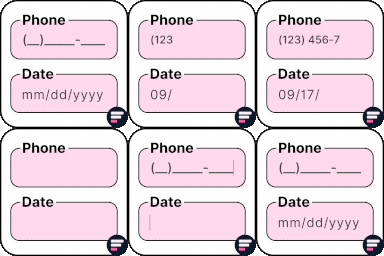
Add input masks to Elementor Pro or Hello Plus form fields - phone, date, time, credit card, CPF, CNPJ, CEP & more for accurate entries.
CHOOSE WHAT YOUR WEBSITE NEEDS
Start with the task you need to solve. Compare features, WordPress and PHP requirements, update history and the author’s documentation. Test changes on a private copy and avoid adding several plugins for the same job.
This independent directory displays plugin information on WebFulHost and links to the official source. Packages are not mirrored or installed here. A plugin can include paid extensions or services with separate terms from its author.

