Connect WordPress to a self-hosted YOURLS instance to create, sync, manage, and track short URLs from the admin area.
★ 5.0/5 (2)40+ active installations
- Version
- 1.1.0
- WordPress
- 6.0+
- PHP
- 7.4+
- Updated
- 22 Nov 2026
View plugin details ↗Event and email marketing. Register guests and collect payment by PayPal or Stripe. Send invitations and newsletters.
★ 4.6/5 (11)200+ active installations
- Version
- 12.3.7
- WordPress
- 5.2+
- PHP
- 5.6+
- Updated
- 21 Nov 2026
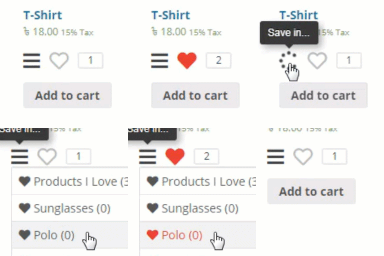
View plugin details ↗Add wishlist feature to your WooCommerce product or any post types.
★ 3.8/5 (13)300+ active installations
- Version
- 1.0.46
- WordPress
- 3.8+
- Updated
- 8 Jun 2026
View plugin details ↗Explore All Features | Documentation | Premium Version
300+ active installations
- Version
- 1.1.1
- WordPress
- 5.2+
- PHP
- 7.2+
- Updated
- 7 Oct 2026
View plugin details ↗A plugin by PushAlert to enable automated Push Notifications for your WordPress website and WooCommerce Store to increase traffic and sales.
★ 4.6/5 (8)900+ active installations
- Version
- 2.9.0
- WordPress
- 2.7+
- Updated
- 14 Aug 2026
View plugin details ↗Allow users to instantly download your free digital products without going through the checkout.
★ 4.7/5 (85)4,000+ active installations
- Version
- 3.6.6
- WordPress
- 4.4+
- PHP
- 7.4.0+
- Updated
- 28 Aug 2026
View plugin details ↗Get leads with a floating contact form tab, chat & social buttons like Facebook Messenger, WhatsApp, Viber, Telegram, Twitter, Instagram & more 🎉
★ 4.9/5 (542)40,000+ active installations
- Version
- 2.4.2
- WordPress
- 4.7+
- Updated
- 18 Nov 2026
View plugin details ↗Easily manage events and sell tickets on your WordPress site. Sugar Calendar is easy-to-use, reliable, and exceptionally powerful. See for yourself.
★ 4.5/5 (24)10,000+ active installations
- Version
- 3.18.0
- WordPress
- 6.2+
- PHP
- 7.4+
- Updated
- 19 Nov 2026
View plugin details ↗Media uploader that adds attachments from URLs to your WordPress media library. Upload images, videos, PDFs, and more with just a URL.
★ 5.0/5 (5)90+ active installations
- Version
- 1.1.0
- WordPress
- 5.6.0+
- PHP
- 7.0+
- Updated
- 22 Oct 2026
View plugin details ↗Hide Gutenberg blocks by device, custom breakpoints, and login status. Syncs with WordPress Hide block controls; Pro adds advanced rules.
★ 5.0/5 (3)900+ active installations
- Version
- 1.2.8
- WordPress
- 5.0+
- PHP
- 7.4+
- Updated
- 19 Jun 2026
View plugin details ↗Create, edit and SEO-optimize WordPress posts and generate images automatically with ChatGPT, Gemini, Claude.ai
★ 5.0/5 (3)70+ active installations
- Version
- 2.4.5
- WordPress
- 6.2+
- PHP
- 8.0+
- Updated
- 20 Aug 2026
View plugin details ↗AI Writer & content generator for WordPress & WooCommerce. Auto blogging, AI writing plugin, product descriptions and SEO content.
★ 4.4/5 (16)1,000+ active installations
- Version
- 3.6.0
- WordPress
- 5.5+
- PHP
- 7.0+
- Updated
- 10 Oct 2026
View plugin details ↗