
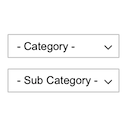
Product Category Dropdowns
By Pektsekye
Displays product categories as dependent drop-down selects.
★ 4.7/5 (12)800+ active installations
- Version
- 1.0.0
- WordPress
- 4.7+
- Updated
- 16 Nov 2026
WORDPRESS RESOURCES
Explore public plugin information from the official WordPress.org directory. Compare what a plugin does, its requirements and update history before adding it to your website.
Explore WordPress hosting →5,741 matching plugins reported by WordPress.org · Page 25 of 50
Source: WordPress.org
Data refreshed 29 Nov 2026 11:00 UTC
By Pektsekye
Displays product categories as dependent drop-down selects.
Build photo galleries in a visual editor. Free MCP support lets Claude, ChatGPT or Cursor create galleries and write your image alt text.

By Softaculous
Send emails from your WordPress site using your preferred SMTP provider like Gmail, Outlook, AWS, Zoho, SMTP.com, Brevo (formerly Sendinblue), Mailgun …
AI-powered helpdesk & support ticket system with chatbot, knowledge base, and smart automation for WordPress.
The Click To Copy Block plugin offers a seamless Gutenberg block for one-click content copying .

By saurabhbhayana
Connect Claude or ChatGPT to your self-hosted WordPress via MCP. Track AI bots, score AEO/GEO, and check your free AI visibility.

By bestwebsoft
Add customizable quotes and tips blocks to WordPress posts, pages and widgets.

By saumya010
FAQ and accordion block for Gutenberg. Bulk paste a whole FAQ at once — add, reorder and edit every question inside one block.
Build WordPress directories with Business Data imports, maps, search, dashboards and analytics, plus AI and MCP workflows.
Lightweight, scalable and full-featured event listings & management plugin for managing events & tickets from the Frontend and Backend.

SEO Autopilot that works with Yoast SEO, Rank Math, All in One SEO, WooCommerce etc. to bulk-generate keyphrases, meta tags, alt text and more.
Poll plugin is a responsive and customizable for WordPress. Poll will help you more easily create powerful poll, image & video poll, vote, results.
CHOOSE WHAT YOUR WEBSITE NEEDS
Start with the task you need to solve. Compare features, WordPress and PHP requirements, update history and the author’s documentation. Test changes on a private copy and avoid adding several plugins for the same job.
This independent directory displays plugin information on WebFulHost and links to the official source. Packages are not mirrored or installed here. A plugin can include paid extensions or services with separate terms from its author.





