

Click Counter and Heat Maps
By Code Domination
Click tracking for any CSS selector, built-in click heat maps, and real-visitor counts with bot filtering.
200+ active installations
- Version
- 1.0.7
- WordPress
- 6.2+
- PHP
- 7.4+
- Updated
- 18 Nov 2026
WORDPRESS RESOURCES
Explore public plugin information from the official WordPress.org directory. Compare what a plugin does, its requirements and update history before adding it to your website.
Explore WordPress hosting →8,548 matching plugins reported by WordPress.org · Page 25 of 50
Source: WordPress.org
Data refreshed 24 Nov 2026 15:31 UTC
By Code Domination
Click tracking for any CSS selector, built-in click heat maps, and real-visitor counts with bot filtering.
Automatically shares the post title or custom message and a link to the post to X/Twitter.
WooCommerce subscriptions made simple: flexible billing cycles, automated recurring payments and built-in Stripe and PayPal support.

By Roland Murg
The booking calendar plugin for WordPress. Get easy online booking with this lightweight and powerful booking calendar.

By apasionados
Lead info with country for Contact Form 7 helps to track users that fill in forms.

By Themepoints
Style your site's scrollbar with a lightweight native CSS mode, live preview, dark mode, scroll boxes, a progress bar and a back-to-top button.
Calculate COGS & profit margins, unlock detailed insights into product profitability, and get better financial analytics with our COGS plugin
Embed Calendly scheduling features in WordPress and optimize your booking flow with custom design, availability indicator, and conversion tools.
By Roland Murg
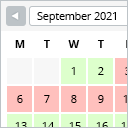
This booking calendar shows when something is booked or available. Use it to show when your holiday home is available for rent, for example.
Interlinks Manager is an SEO WordPress plugin that gives you the ability to monitor and optimize your internal links.

By nintechnet
A lightweight, fast and powerful virus scanner for WordPress.
Design and display custom buttons anywhere on your site. Add floating or inline buttons with icons, advanced targeting, and built-in analytics.
CHOOSE WHAT YOUR WEBSITE NEEDS
Start with the task you need to solve. Compare features, WordPress and PHP requirements, update history and the author’s documentation. Test changes on a private copy and avoid adding several plugins for the same job.
This independent directory displays plugin information on WebFulHost and links to the official source. Packages are not mirrored or installed here. A plugin can include paid extensions or services with separate terms from its author.





