

Create unlimited WooCommerce product feeds for Google Shopping, Facebook, Instagram & 25+ top channels. Easy feed mapping, filters, and auto updates.
★ 4.8/5 (27)2,000+ active installations
- Version
- 2.4.5
- WordPress
- 4.0+
- PHP
- 5.6+
- Updated
- 27 Nov 2026
WORDPRESS RESOURCES
Explore public plugin information from the official WordPress.org directory. Compare what a plugin does, its requirements and update history before adding it to your website.
Explore WordPress hosting →10,000 matching plugins reported by WordPress.org · Page 26 of 50
Source: WordPress.org
Data refreshed 29 Nov 2026 02:52 UTC
Create unlimited WooCommerce product feeds for Google Shopping, Facebook, Instagram & 25+ top channels. Easy feed mapping, filters, and auto updates.

By Premmerce
The Premmerce Product Filter for WooCommerce plugin is a professional tool for managing filters with perfect Ajax and unique SEO features.

WooCommerce product feed plugin for Google, Microsoft & Meta, including AI-powered optimisation, PMax, GA4 & Customer Match List. A 14-day free trial.

Every store loses sales to cart abandonment. But with Cart Abandonment Recovery for WooCommerce, you can win them back—automatically.

By Steve Truman
Create a true Supermarket shopping experience. Sort and show products on Shop page by category - auto show On Sale or Featured first, Endless Scroll.

By PixelYourSite
Add Meta Pixel with Conversion API, Google Analytics (GA4) + Consent Mode, Google Tag Manager, OpenAI Pixel & API, and Head & Footer scripts.

By World Web Technology
Display Recently Purchased Products For Woocommerce using Widget and Shortcode

Feature-packed membership plugin for creating subscription plans, adding recurring payments & content restriction on your membership site.
By Pektsekye
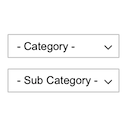
Displays product categories as dependent drop-down selects.

By itthinx
A sample product generator for WooCommerce.
Provides features to create PDF files from form submissions and attach files to email notifications.

By colorlibplugins
Easily reorder posts, pages, custom post types, and taxonomies with intuitive drag-and-drop sorting in the WordPress admin.
CHOOSE WHAT YOUR WEBSITE NEEDS
Start with the task you need to solve. Compare features, WordPress and PHP requirements, update history and the author’s documentation. Test changes on a private copy and avoid adding several plugins for the same job.
This independent directory displays plugin information on WebFulHost and links to the official source. Packages are not mirrored or installed here. A plugin can include paid extensions or services with separate terms from its author.
