

Automatically create smart internal links with AI anchor text. Rescue orphan pages, monitor 404s, and track clicks for maximum SEO impact.
90+ active installations
- Version
- 34.1.9
- WordPress
- 6.2+
- PHP
- 7.4+
- Updated
- 30 Sep 2026
WORDPRESS RESOURCES
Explore public plugin information from the official WordPress.org directory. Compare what a plugin does, its requirements and update history before adding it to your website.
Explore WordPress hosting →2,279 matching plugins reported by WordPress.org · Page 26 of 50
Source: WordPress.org
Data refreshed 21 Nov 2026 06:45 UTC
Automatically create smart internal links with AI anchor text. Rescue orphan pages, monitor 404s, and track clicks for maximum SEO impact.

By Qrzysio
Say goodbye to JPG and PNG - make your site run on fast, modern WebP images.
Write, send and track newsletters from WordPress. Block-based email editor, unlimited contacts and lists, sending through your host or SMTP.
By Denis Botić
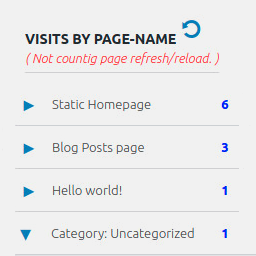
Display number of visits for each page in admin dashboard and browser developer-tool/console. Doesn't count page refresh as a new visit...

By Sirv CDN and Image Hosting
Serve perfectly optimized images, videos, models and 360 spins. The best WordPress & WooCommerce CDN plugin for media.

By IP2Location
Redirects visitors to a blog page or a predefined URL based on their country and region geolocated using IP address.

By wedos.com
Protect WordPress with WEDOS Global: cloud WAF, DDoS protection, CDN, page cache and proof-of-work form protection (beta).

By datafeedr
Import products from the Datafeedr API into your WooCommerce store.

By JDAdmin
Lightweight HTML5 video player and video hosting with CDN built for WordPress

By Abhishek Deshpande
Disable unused WordPress features and remove bloat. 120 switches for performance, security and WooCommerce — pure PHP, no .htaccess, no upsell.

By Code and core
Optimize your WordPress site with advanced caching, minification, and performance tools for faster loading.
Import and export WordPress posts, pages, users and media from any CSV or XML file, URL, FTP or Google Sheets — with visual field mapping.
CHOOSE WHAT YOUR WEBSITE NEEDS
Start with the task you need to solve. Compare features, WordPress and PHP requirements, update history and the author’s documentation. Test changes on a private copy and avoid adding several plugins for the same job.
This independent directory displays plugin information on WebFulHost and links to the official source. Packages are not mirrored or installed here. A plugin can include paid extensions or services with separate terms from its author.

