

Category Filter Block
By Misha Rudrastyh
Just a simple category filter block with the Interactivity API support.
★ 5.0/5 (1)100+ active installations
- Version
- 1.2.1
- WordPress
- 6.5+
- PHP
- 7.3+
- Updated
- 5 Sep 2026
WORDPRESS RESOURCES
Explore public plugin information from the official WordPress.org directory. Compare what a plugin does, its requirements and update history before adding it to your website.
Explore WordPress hosting →1,913 matching plugins reported by WordPress.org · Page 26 of 50
Source: WordPress.org
Data refreshed 28 Nov 2026 08:59 UTC
By Misha Rudrastyh
Just a simple category filter block with the Interactivity API support.
By scribu
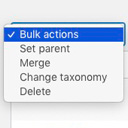
Allows you to merge terms, move terms between taxonomies, and set term parents, individually or in bulk.

Restrict content based on login status, user roles, device type & more. Monetize your content with a paywall or members-only content.
Recover lost revenue with Cart Abandonment Recovery for WooCommerce. Increase retention with Post Purchase Follow-Up Emails.

Turn your WordPress or WooCommerce site into a native Android & iOS app in minutes — no coding required.

By Naked Cat Plugins
Lets you associate a tracking code with a WooCommerce order so that both the store owner and the client can track the order sent with CTT

By alexvtn
Chatbox Manager allow you to display multiple WhatsApp buttons on your website.

By AIOSEO Plugin Team
Duplicate or clone posts, pages and custom post types in one click, then rewrite and republish a published post over the original.

By keith_wp
Makes any previous/next post links use the same taxonomy as the current post.

By YummyWP
Boost WooCommerce sales with instant Ajax product search — live suggestions, fullscreen popup, SKU search, and GA4 analytics, all in one plugin.
All in one WordPress plugin - accessibility, tag manager, notes, floating contact buttons, back to top, cookie bar and more.

By robfelty
Adds a widget which uses Javascript to dynamically expand or collapse the set of posts for each category.
CHOOSE WHAT YOUR WEBSITE NEEDS
Start with the task you need to solve. Compare features, WordPress and PHP requirements, update history and the author’s documentation. Test changes on a private copy and avoid adding several plugins for the same job.
This independent directory displays plugin information on WebFulHost and links to the official source. Packages are not mirrored or installed here. A plugin can include paid extensions or services with separate terms from its author.

