

Import Airtable posts, users & taxonomies to WordPress. Send WPForms, Gravity Forms, CF7, Fluent, Elementor, Formidable & Ninja Forms to Airta …
★ 5.0/5 (1)70+ active installations
- Version
- 2.0.4
- WordPress
- 5.9+
- PHP
- 8.0+
- Updated
- 8 Nov 2026
WORDPRESS RESOURCES
Explore public plugin information from the official WordPress.org directory. Compare what a plugin does, its requirements and update history before adding it to your website.
Explore WordPress hosting →2,073 matching plugins reported by WordPress.org · Page 28 of 50
Source: WordPress.org
Data refreshed 28 Nov 2026 16:55 UTC
Import Airtable posts, users & taxonomies to WordPress. Send WPForms, Gravity Forms, CF7, Fluent, Elementor, Formidable & Ninja Forms to Airta …
Easily create & manage documentation. Reduce support tickets & scale your customer support workload. This simple plugin works with any theme.
Made it through the SEO plugin wasteland? You've earned a coffee ☺️ Quietly powerful AI SEO that actually works. No bloat, just results. Enjoy! 💕
By PickPlugins
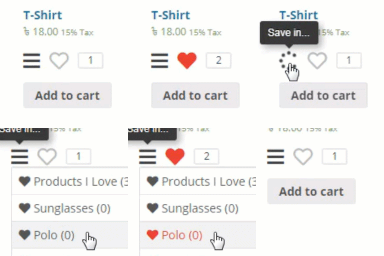
Add wishlist feature to your WooCommerce product or any post types.

By GrandSlambert
Show posts from any taxonomy in a sidebar or Elementor, with images, excerpts, and style controls.

By Fahad Mahmood
Loops through your posts and pages in alphabetical order, with previous and next links that wrap around at both ends.

By HT Plugins
JustTables is a Product Tables plugin for WooCommerce.

By Andrei Surdu
Create unlimited custom sidebars and widget areas. Display different sidebars on specific pages, posts, or custom post types with conditional logic.

By Milan Petrovic
Generate demo posts, users, terms, comments, and images for WordPress development and testing, plus sample WooCommerce and bbPress content.

By Naked Cat Plugins
Share WooCommerce discount links: pass a coupon code via URL, display sale prices on product pages, and auto-apply the coupon at checkout.

Elementor addons: Elementor widgets, Elementor templates, 100+ widgets, 4 000+ templates, Mega Menu, Popup Builder, WooCommerce Builder, AI tools.

By threadi
Use a Gutenberg Block to manage a download list with file type specific icons. No configuration is necessary.
CHOOSE WHAT YOUR WEBSITE NEEDS
Start with the task you need to solve. Compare features, WordPress and PHP requirements, update history and the author’s documentation. Test changes on a private copy and avoid adding several plugins for the same job.
This independent directory displays plugin information on WebFulHost and links to the official source. Packages are not mirrored or installed here. A plugin can include paid extensions or services with separate terms from its author.

