Turn dropdowns into color, image, and button swatches for WooCommerce Variable Products. No coding needed.
★ 4.8/5 (926)300,000+ active installations
- Version
- 2.6.2
- WordPress
- 6.8+
- PHP
- 7.4+
- Updated
- 28 Oct 2026
View plugin details ↗Free Elementor addons plugin with 80+ widgets, 5+ extensions, Theme builder, 250+ Elementor templates, 500+ modern UI sections for Elementor websites.
★ 5.0/5 (6)3,000+ active installations
- Version
- 2.2.3
- WordPress
- 5.0+
- PHP
- 5.6+
- Updated
- 28 Oct 2026
View plugin details ↗Enhance your website with UiCore Elements – a free plugin offering diverse widgets for effortless design enrichment.
40,000+ active installations
- Version
- 1.3.19
- WordPress
- 4.6+
- PHP
- 7.4+
- Updated
- 10 Nov 2026
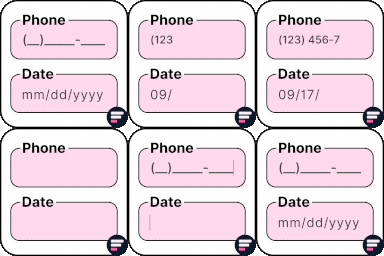
View plugin details ↗Add input masks to Elementor Pro or Hello Plus form fields - phone, date, time, credit card, CPF, CNPJ, CEP & more for accurate entries.
★ 4.1/5 (18)10,000+ active installations
- Version
- 2.7.4
- WordPress
- 5.5+
- PHP
- 7.4+
- Updated
- 1 Sep 2026
View plugin details ↗Showcase your podcast only using podcasting feed url. Use widget, shortcode or editor block to display podcast player anywhere on your site.
★ 4.8/5 (113)10,000+ active installations
- Version
- 8.3.9
- WordPress
- 4.9+
- PHP
- 5.6+
- Updated
- 18 Nov 2026
View plugin details ↗Photo Gallery is a cool responsive image gallery plugin with beautiful views
★ 4.8/5 (19)1,000+ active installations
- Version
- 6.9.3
- WordPress
- 4.0+
- Updated
- 13 Nov 2026
View plugin details ↗Gutenify is a free WordPress plugin with 40+ Gutenberg blocks and ready-made starter templates for building your site visually, without code.
★ 4.6/5 (12)4,000+ active installations
- Version
- 1.9.2
- WordPress
- 6.4+
- PHP
- 7.4+
- Updated
- 19 Nov 2026
View plugin details ↗Opt-in AI for WordPress: one stable feature plus experiments that may change or be removed. Needs an AI provider plugin and your own API key.
★ 4.2/5 (10)60,000+ active installations
- Version
- 1.5.0
- WordPress
- 7.0.3+
- PHP
- 7.4+
- Updated
- 30 Oct 2026
View plugin details ↗WP Delicious is an SEO-optimized and Schema-friendly recipe plugin for food bloggers to create and display unlimited recipes.
★ 4.9/5 (72)4,000+ active installations
- Version
- 1.10.12
- WordPress
- 5.8+
- PHP
- 7.4+
- Updated
- 16 Nov 2026
View plugin details ↗A fully featured, easy-to-use documentation plugin with AI chat, search, FAQs, and quizzes. Build beautiful knowledge bases, docs, and wikis.
★ 4.9/5 (124)10,000+ active installations
- Version
- 17.320.0
- WordPress
- 5.3+
- PHP
- 5.6+
- Updated
- 8 Nov 2026
View plugin details ↗Organize and manage your files with WordPress media folders. Fast, flexible, and professional.
★ 4.3/5 (22)6,000+ active installations
- Version
- 2.5.7
- WordPress
- 5.2+
- PHP
- 7.2+
- Updated
- 1 Nov 2026
View plugin details ↗Add watermarks to WooCommerce product images to protect your content and promote your brand.
★ 3.7/5 (55)2,000+ active installations
- Version
- 3.3
- WordPress
- 5.0+
- PHP
- 7.4+
- Updated
- 17 Nov 2026
View plugin details ↗