

Button Group
By WPDeveloper
Create Two Buttons To Be Stacked Together
★ 5.0/5 (1)100+ active installations
- Version
- 1.3.3
- WordPress
- 6.0+
- PHP
- 7.4+
- Updated
- 15 Nov 2026
WORDPRESS RESOURCES
Explore public plugin information from the official WordPress.org directory. Compare what a plugin does, its requirements and update history before adding it to your website.
Explore WordPress hosting →1,963 matching plugins reported by WordPress.org · Page 29 of 50
Source: WordPress.org
Data refreshed 22 Nov 2026 07:04 UTC
By WPDeveloper
Create Two Buttons To Be Stacked Together

By orqadesign
Easily display and cache the latest posts from a Bluesky user using a shortcode.
Easily manage events and sell tickets on your WordPress site. Sugar Calendar is easy-to-use, reliable, and exceptionally powerful. See for yourself.

By lenasterg
Search millions of CC-licensed images without leaving WordPress editor. Use one into your post content or set as featured image very quickly.

By Mizan Themes
Easily import demo data for Mizan Themes with one click. Fully Elementor compatible, it sets up plugins, images, content, and settings seamlessly!

Display posts in Grid, Carousel, Slider, Timeline, List & Live Filter layouts with Gutenberg Blocks & Ready Patterns - Elementor, Divi, & Shortcodes.
Add extra data fields, custom post types and taxonomies, and manage all your WordPress content visually — without writing any code.

By Ankur
Import Word documents into WordPress while preserving links, lists, formatting, images, tables, and more.
Manage WordPress from Claude or ChatGPT with a free MCP server: posts, WooCommerce, SEO and Elementor. AI chatbot and content writer included.
By RS WP THEMES
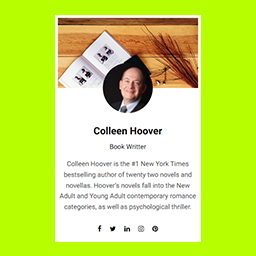
A simple and lightweight widget to display an author's name, profile image, short description, and social media links in any sidebar or widget area.

By Ben Balter
Document management and version control for WordPress. Collaborate on files, track every revision, and auto-generate change summaries with AI.

All-in-One Sticky Anything easily creates click to call, fixed widgets, sticky elements, sticky header, menu, sidebar, social icons & cookie consent.
CHOOSE WHAT YOUR WEBSITE NEEDS
Start with the task you need to solve. Compare features, WordPress and PHP requirements, update history and the author’s documentation. Test changes on a private copy and avoid adding several plugins for the same job.
This independent directory displays plugin information on WebFulHost and links to the official source. Packages are not mirrored or installed here. A plugin can include paid extensions or services with separate terms from its author.


