

The fastest, GDPR-compliant all in one social feed. Display blazing-fast Instagram, Facebook, TikTok, YouTube & X feeds in a beautiful Social Wall.
★ 4.6/5 (502)30,000+ active installations
- Version
- 7.0.0
- WordPress
- 3.3+
- Updated
- 24 Nov 2026
WORDPRESS RESOURCES
Explore public plugin information from the official WordPress.org directory. Compare what a plugin does, its requirements and update history before adding it to your website.
Explore WordPress hosting →5,208 matching plugins reported by WordPress.org · Page 29 of 50
Source: WordPress.org
Data refreshed 24 Nov 2026 17:48 UTC
The fastest, GDPR-compliant all in one social feed. Display blazing-fast Instagram, Facebook, TikTok, YouTube & X feeds in a beautiful Social Wall.

By Steve Truman
Bring your product pages and presentation alive with Dynamic Product Gallery for WooCommerce. Beautifully.
Add 50+ shortcodes with live preview for tabs, accordions, buttons, FAQs, sliders and boxes. Works in Block Editor and Classic Editor.

By Senff - a11n
The Gutenberg Sticky Block will stick at the top of the page once you scroll down.
Use Subscribe Forms to grow your email subscriber lists with Subscribe Forms built-in email forms templates and integrations 📧

By PluginRx
Site developers and operators can easily create help documentation and notices for the admin area.

By artplacer
Allow your visitors visualize how artworks look on walls as soon as they land on your website!

By Anshul Gangrade
Add animated headlines to posts, pages, and widgets using a shortcode, Gutenberg block, Elementor widget, or WPBakery element.

By berkux
Monitor PHP memory usage, set alert thresholds, and diagnose your server configuration — directly inside WordPress admin.

By Rustaurius
Add a responsive slider to any page with a block shortcode. Multiple slide effects. WooCommerce slider integration.
Email marketing, newsletters & email automation for WordPress. Manage WooCommerce emails & build email newsletter campaigns with weMail.
By RS WP THEMES
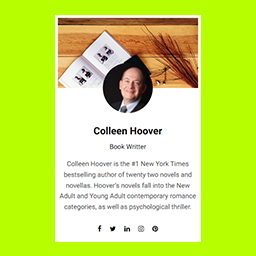
A simple and lightweight widget to display an author's name, profile image, short description, and social media links in any sidebar or widget area.
CHOOSE WHAT YOUR WEBSITE NEEDS
Start with the task you need to solve. Compare features, WordPress and PHP requirements, update history and the author’s documentation. Test changes on a private copy and avoid adding several plugins for the same job.
This independent directory displays plugin information on WebFulHost and links to the official source. Packages are not mirrored or installed here. A plugin can include paid extensions or services with separate terms from its author.


