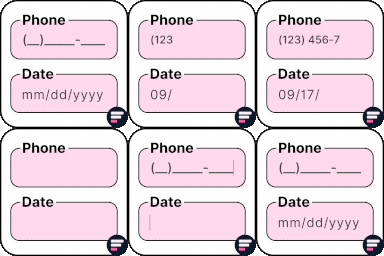
Add input masks to Elementor Pro or Hello Plus form fields - phone, date, time, credit card, CPF, CNPJ, CEP & more for accurate entries.
★ 4.1/5 (18)10,000+ active installations
- Version
- 2.7.4
- WordPress
- 5.5+
- PHP
- 7.4+
- Updated
- 1 Sep 2026
View plugin details ↗Display Woocommerce reviews anywhere using shortcode. Specify reviews using product ID. Now supports Masonry layout.
★ 4.8/5 (26)600+ active installations
- Version
- 2.0.0
- WordPress
- 4.6+
- Updated
- 29 May 2026
View plugin details ↗Show estimated / guaranteed delivery, simple and easy
★ 5.0/5 (13)1,000+ active installations
- Version
- 2.0.1
- WordPress
- 5.3+
- PHP
- 7.4+
- Updated
- 21 Oct 2026
View plugin details ↗Display a random number anywhere with a shortcode. Set a min/max range, choose number formatting and get a fresh value on every page load.
★ 3.7/5 (6)700+ active installations
- Version
- 1.3.0
- WordPress
- 5.8+
- PHP
- 7.4+
- Updated
- 27 Oct 2026
View plugin details ↗Using Simple HTML Sitemap plugin, you can add HTML Sitemap anywhere on the website using Shortcode.
★ 4.9/5 (10)3,000+ active installations
- Version
- 3.9
- WordPress
- 6.0+
- PHP
- 7.4+
- Updated
- 2 Jul 2026
View plugin details ↗Apply input masks in Elementor form widget fields - phone, date, time, credit card, CPF, CNPJ, CEP & more for valid and error-free entries.
★ 4.5/5 (24)10,000+ active installations
- Version
- 4.4.5
- WordPress
- 5.0+
- PHP
- 7.2+
- Updated
- 1 Sep 2026
View plugin details ↗Connects an API to WordPress: Get API-data (JSON, XML, CSV...), show it with a Shortcode, a JCI Block or PHP. Generate a template with the JCI Block
★ 4.9/5 (78)5,000+ active installations
- Version
- 2.0.17
- WordPress
- 6.9+
- PHP
- 7.0+
- Updated
- 6 Nov 2026
View plugin details ↗Adds rel="nofollow" to posts external links unless specified otherwise.
★ 5.0/5 (4)700+ active installations
- Version
- 1.4
- WordPress
- 3.7+
- Updated
- 16 Aug 2026
View plugin details ↗Build a configurable dropdown whose options redirect visitors to the URLs you choose: network sites, or your own custom links.
★ 5.0/5 (19)900+ active installations
- Version
- 1.0.0
- WordPress
- 6.0+
- PHP
- 8.3+
- Updated
- 12 Sep 2026
View plugin details ↗Easily import any file of any size into any plugin, post type, custom field, or taxonomy. Supports WooCommerce, ACF, images, galleries, users, real es …
★ 4.7/5 (1,966)100,000+ active installations
- Version
- 4.2.0
- WordPress
- 5.0+
- PHP
- 7.4+
- Updated
- 10 Nov 2026
View plugin details ↗Get WordPress vulnerability alerts from the WPVulnerability Database API.
★ 5.0/5 (20)10,000+ active installations
- Version
- 5.1.6
- WordPress
- 4.7+
- PHP
- 7.0+
- Updated
- 23 Aug 2026
View plugin details ↗This plugin easily displays the folders and files from a selected directory. It can be placed by shortcode in any post.
★ 4.7/5 (21)400+ active installations
- Version
- 0.25
- WordPress
- 4.0+
- Updated
- 18 Aug 2026
View plugin details ↗