

Force Login
By Kevin Vess
Force Login is a simple lightweight plugin that requires visitors to log in to interact with the website.
★ 4.8/5 (101)30,000+ active installations
- Version
- 5.6.3
- WordPress
- 4.6+
- Updated
- 19 Jun 2026
WORDPRESS RESOURCES
Explore public plugin information from the official WordPress.org directory. Compare what a plugin does, its requirements and update history before adding it to your website.
Explore WordPress hosting →4,491 matching plugins reported by WordPress.org · Page 3 of 50
Source: WordPress.org
Data refreshed 20 Nov 2026 18:34 UTC
By Kevin Vess
Force Login is a simple lightweight plugin that requires visitors to log in to interact with the website.
Log in as any WordPress user with one click. Troubleshoot issues and support customers without asking for their password.

By Marketing Fire
Redirect users to different locations after they log in, log out and register based on different conditions.

By storeapps
Give developers or support staff temporary admin access to your WordPress site — no username, no password, and it expires automatically.

By Elementor
The Elementor Website Builder has it all: drag and drop page builder, Atomic Editor, pixel perfect design, global and reusable style systems, mobile r …

By WebFactory
Hide wp-login.php file, prevent attacks on login form, hide login & increase security. No files are changed.

By David Anderson / Team Updraft
Protect your WordPress site with All-In-One Security (AIOS): easy-to-use login security, a powerful firewall, and much more.

By Marco van Wieren
Seamless Microsoft Entra | Ext. ID | B2C | M365 Integration for WordPress. For SSO, Mail, Roles, Access, Sync, Copilot, SharePoint, PowerBI.

By Alberto Hornero
Frontend login, registration, profile and password reset forms with blocks or shortcodes. WPML certified, reCAPTCHA and WooCommerce compatible.

By tmatsuur
This plugin will create a new login page for your site. You can also create separate login pages for administrators and for other users.

By Andrew Lima
Show a users last login date by creating a sortable column in your WordPress users list.
By Robert Peake
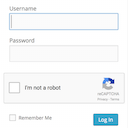
Adds a Google No Captcha ReCaptcha checkbox to your Wordpress and Woocommerce login, forgot password, and user registration pages.
CHOOSE WHAT YOUR WEBSITE NEEDS
Start with the task you need to solve. Compare features, WordPress and PHP requirements, update history and the author’s documentation. Test changes on a private copy and avoid adding several plugins for the same job.
This independent directory displays plugin information on WebFulHost and links to the official source. Packages are not mirrored or installed here. A plugin can include paid extensions or services with separate terms from its author.
