AI content strategy with human review: keyword research, topic clusters and AI drafts that wait for your approval before they publish.
0+ active installations
- Version
- 2.0.240
- WordPress
- 6.2+
- PHP
- 7.4+
- Updated
- 11 Oct 2026
View plugin details ↗Enhances the privacy of your users and visitors with gravatar opt-in and local avatars.
★ 5.0/5 (25)1,000+ active installations
- Version
- 2.7.0
- WordPress
- 5.6+
- PHP
- 7.4+
- Updated
- 1 May 2023
View plugin details ↗Creates a landing page for your feed subscription and out of the box working newsletter subscription form.
★ 5.0/5 (1)10+ active installations
- Version
- 0.4.3
- WordPress
- 3.5+
- Updated
- 1 Jun 2018
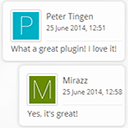
View plugin details ↗Set custom avatars for users with no Gravatar. The avatar will be the first (or any other) letter of user's name on a colorful background.
★ 4.7/5 (33)2,000+ active installations
- Version
- 2.2.8
- WordPress
- 4.6+
- Updated
- 11 Mar 2017
View plugin details ↗A WordPress-BuddyPress plugin to set fancy custom avatars for users with no Gravatar and no profile picture.
★ 4.9/5 (16)100+ active installations
- Version
- 2.2.8
- WordPress
- 4.6+
- Updated
- 11 Mar 2017
View plugin details ↗Create beautiful, responsive pricing tables, using intuitive interface
10+ active installations
- Version
- 1.0.0
- WordPress
- 3.6.0+
- PHP
- 5.2.4+
- Updated
- 29 Apr 2018
View plugin details ↗Add slick looking Amazon Carousel widgets to your blog posts in a brain-dead simple way! Just say [carousel] to add a Carousel anywhere on your blog.
10+ active installations
- Version
- 1.6
- WordPress
- 2.5+
- Updated
- 6 Sep 2010
View plugin details ↗