

Automatically share and schedule your WordPress content on top social platforms like Facebook, Instagram, LinkedIn, TikTok, and more.
★ 4.5/5 (2,111)40,000+ active installations
- Version
- 9.1.7
- WordPress
- 6.2+
- PHP
- 7.4+
- Updated
- 6 Nov 2026
WORDPRESS RESOURCES
Explore public plugin information from the official WordPress.org directory. Compare what a plugin does, its requirements and update history before adding it to your website.
Explore WordPress hosting →1,289 matching plugins reported by WordPress.org · Page 3 of 50
Source: WordPress.org
Data refreshed 22 Nov 2026 09:35 UTC
Automatically share and schedule your WordPress content on top social platforms like Facebook, Instagram, LinkedIn, TikTok, and more.

Social media automation, social media scheduling and auto publish for WordPress posts to Facebook, X/Twitter, Threads, LinkedIn, Telegram and more.
Automatically share your WordPress posts on multiple social networks like Facebook, X (Twitter), LinkedIn, Instagram and more.

Membership & community plugin with user profiles, registration & login, member directories, content restriction, user roles and much more.
By Jelle Roorda
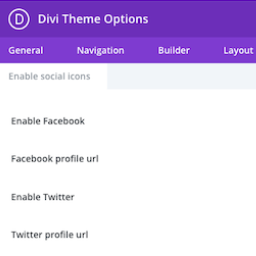
This plugin adds the ability to add more social icons to your website when using the Divi theme.

By Saad Iqbal
Control how your WordPress posts, pages, WooCommerce products, and custom post types look when shared on Facebook, X/Twitter, LinkedIn, WhatsApp, Slac …

By NextScripts
Automatically publishes blog posts to profiles, pages, groups, and communities across supported social networks.

By WPZOOM
Instagram feed plugin for WordPress: Display your Instagram photos, videos & reels. Easy setup with Gutenberg block, widget, shortcode & Elementor

By Softaculous
Loginizer is a WordPress security plugin which helps you fight against bruteforce attacks.

By Trustindex
Facebook Feed Widgets. Display your Facebook feed on your website to increase engagement, sales and SEO.

By Disqus
Disqus is the web's most popular comment system. Use Disqus to increase engagement, retain readers, and grow your audience.

By BuddyPress
Get together safely, in your own way, in WordPress.
CHOOSE WHAT YOUR WEBSITE NEEDS
Start with the task you need to solve. Compare features, WordPress and PHP requirements, update history and the author’s documentation. Test changes on a private copy and avoid adding several plugins for the same job.
This independent directory displays plugin information on WebFulHost and links to the official source. Packages are not mirrored or installed here. A plugin can include paid extensions or services with separate terms from its author.
